Share It On:
 Navigate Zoom's strict review process with our researched guide covering prerequisites, security audits, and common rejection pitfalls for app developers.
Publishing an app on the Zoom App Marketplace usually takes longer than teams plan for, and the delay sits in the review rather than the build. How long the review runs depends almost entirely on the preparation you did before submitting.
Zoom’s approval process is famously rigorous, and for good reason, they are hyper-protective of user data and platform integrity. You can't just throw code at the wall and see what sticks. Zoom states that review time varies with app quality, usability, the number and function of the features requested, and the clarity of the information supplied.
Apps with well-defined scopes, a clear test plan and precise listing copy move through fastest. Stage-by-stage walkthroughs of the Zoom app submission process are a useful companion to Zoom's official documentation, which sets out what each check covers without saying much about the order things happen in or how long each part takes.
So, we have done deep research into Zoom’s specific review mechanisms and developer guidelines to map out exactly what it takes to get the green light.
The Prerequisites: What You Need Before You Start
Before you even look at the submission button, your foundation needs to be sorted. Zoom doesn’t entertain incomplete setups, so squaring these away early saves a lot of headaches later.
1. Account and Administrative Requirements
To build and submit an app, you need the right credentials. You must have an active Zoom account with either Account Owner or Admin privileges. A standard user account won't cut it because the Marketplace requires high-level permissions to manage OAuth credentials, domain validation, and app activation.
If you are developing on behalf of a larger organization, make sure your IT team provisions the correct admin rights to your developer workspace from day one.
2. Choosing Your App Architecture: User-Level vs. Account-Level
This is a critical architectural decision that dictates how your app behaves and how hard it will be to get approved. You need to lock this in early.
| App Architecture | Target Audience | Data Access (OAuth Scopes) | Admin Pre-Approval Required? |
|---|---|---|---|
| User-Level Apps | Individual users (e.g., a personal productivity timer) | Limited to the specific user's data | No (Users install it themselves) |
| Account-Level Apps | Entire organizations (e.g., enterprise CRM integrations) | Can access data across all users in the account | Yes (Requires account admin approval) |
Pro Tip: If your application doesn't strictly need organization-wide data, default to a User-Level app. They generally move through the compliance and security review phases a bit faster because the blast radius for potential data exposure is much smaller.
The Zoom App Review Process
Once you hit submit, your app enters a multi-layered review pipeline. Zoom doesn't just run an automated script and call it a day; real humans tear down your app to ensure it meets their standards.
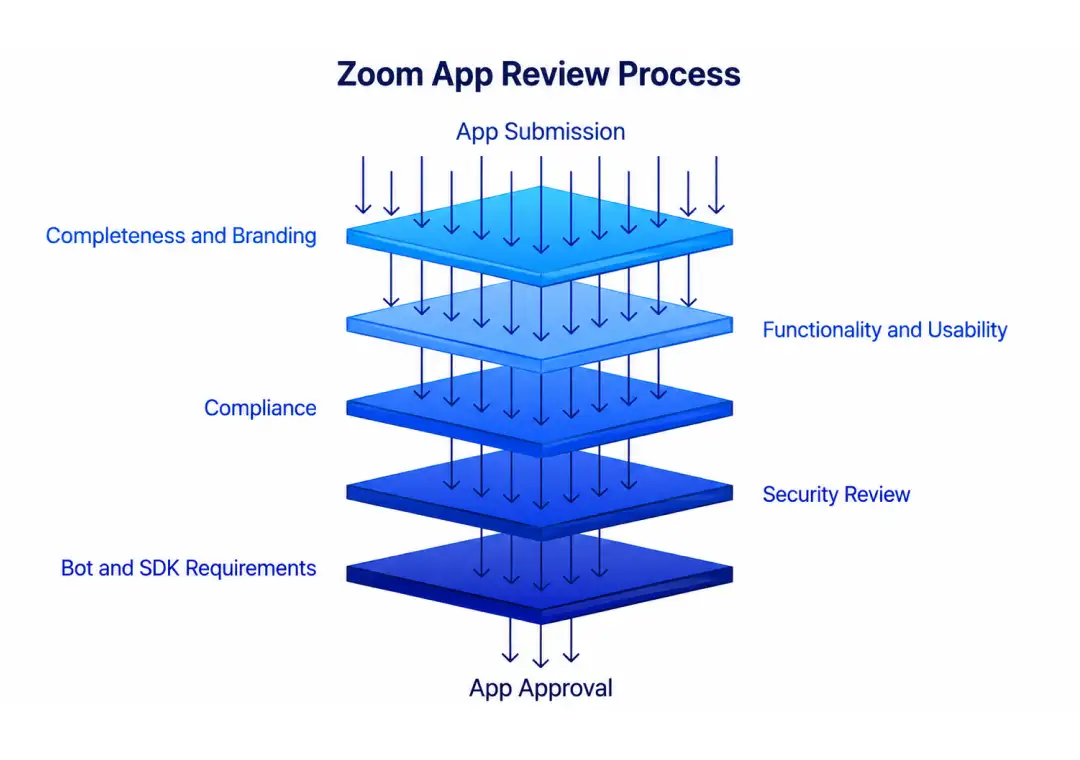
1. Submission completeness and branding
Zoom's first check verifies that your submission meets the minimum criteria to enter the review at all. It includes:
- Accurate metadata
- Technical design documentation
- Security information
Branding is assessed alongside it. Zoom looks at how you represent your own product and how Zoom appears inside your app or on your domain. Your app name needs to be distinct, and your description needs to be specific rather than generic.
Zoom reserves the right to require revisions to any content, including the app name, that conflicts with its branding requirements, the Marketplace Developer Agreement, or its Terms of Service.
2. Functionality, usability and compliance
Your app is then tested against what you said it does. Zoom confirms installation and uninstallation, configuration settings, and the user sign-up flow, then uses the Zoom integration inside your app to check that data moves the way your documentation describes.
Usability is judged on the experience a typical user would have. Zoom expects your app to blend into the Zoom experience rather than interrupt it. This naturally rules out unnecessary pop-ups, unexpected computer audio, and anything that reads as spam.
Compliance runs before security testing. Zoom reads your technical design documentation covering your stack, architecture and data handling, and checks it against its own security and privacy requirements.
3. The security review
The security review is the most involved stage. Zoom reads the technical design you completed during the build flow to understand how the app is built, what controls are in place, and how it uses data collected through OAuth scopes.
It then evaluates your scopes directly, verifying that you requested only the minimum needed for the app to function. Anything unused or inappropriate gets flagged for removal.
Testing then assesses your app against the OWASP Top 10, with web application security scanning, checks for vulnerable libraries, verification of least-privilege access, and manual testing for misuse.
Every additional scope you request adds testing surface and review time, and each one needs its own justification and testing instructions. Requesting both "View and manage user meetings" and "View user meetings" is a common redundancy, since the first already covers everything the second does.
4. Extra requirements for bots and SDK apps
Apps built on the Meeting SDK carry a second layer. Zoom tests the end user experience, confirms you are using production credentials, tests every requested scope and feature, and checks your deauthorization and removal process.
Your test plan needs to say explicitly whether the app joins meetings as a bot participant, whether it is device-specific, and whether it runs on unreleased software.
The app also has to follow Zoom's recording and live streaming permission requirements. From March 2, 2026, apps joining meetings outside their own account must be authorized using On Behalf Of tokens, ZAK tokens, or RTMS.
Step-by-Step Guide to Submitting Your App
When your code is polished and your environments are secure, it is time to push for production.
Step 1: Completing the Submission Checklist
Navigate to the Zoom App Marketplace Developer Portal. You’ll need to methodically fill out all required fields, including developer contact information, support links, and your finely-tuned app descriptions. Don't rush this part; typos or dead links here look highly unprofessional to the review team.
Step 2: Domain Validation
Zoom requires proof that you actually own the domain associated with your app. You cannot submit an app hosted on a generic or unverified domain. The portal offers a few ways to handle this:
- Adding a specific TXT record to your domain's DNS settings.
- Uploading an HTML file provided by Zoom to your root directory.
- Adding a specific tag to your homepage.
Step 3: Crafting the Perfect Release Notes
When you submit, you have the option to include release notes and instructions for the review team. Do not leave this blank.
Provide a clear, bulleted test plan and include a set of dedicated test credentials. If the reviewers have to email you to figure out how to log in or trigger a specific workflow, you've just added days to your review timeline. Hand them the keys so they can get to work immediately.
What It Costs
The direct Marketplace App Development cost of building is engineering time. It takes a team of engineers 6 months on average to integrate with a single meeting platform. The indirect one is what you spend finding out whether the feature was worth building at all.
If you took the buy route with Recall.ai, you would pay $0.50 per recording hour or less, with the price scaling down with volume. There is no platform fee, no minimum, no commitment and free credits are included to start. Their usage-based pricing keeps the cost of a proof of concept close to zero.
5 Common Reasons for App Rejection (And How to Fix Them)
We have analyzed the ecosystem, and the same roadblocks trip up developers time and time again. Avoid these unforced errors:
- Overreaching OAuth Scopes: As mentioned, asking for too much data access is the number one red flag. Audit your scopes before submission and strip out anything that isn't strictly necessary.
- Broken Uninstallation Flow: When a user uninstalls your app (Deauthorization), your app must successfully receive Zoom's webhook and wipe the user's data according to your retention policy. If this webhook fails, you fail.
- Incomplete Test Credentials: If the review team hits a paywall or a login screen they can't bypass, the review stops immediately. Always provide active, fully provisioned test accounts.
- Branding Violations: Double-check your app name, marketing assets, and domain name to ensure you aren't infringing on Zoom's trademarks.
- Missing Data Deletion Mechanisms: Your privacy policy must not only be clear, but your app must physically support user requests to have their data purged.
You're Approved! What Happens Next?
Getting the approval email is a great feeling, but the work doesn't stop there.
1. App Activation Options
Once approved, you have to decide how it goes live. You can choose Immediate Activation, where Zoom pushes it to the Marketplace instantly, or Manual Activation, which lets you align the Marketplace launch with your own marketing campaigns and product release schedules.
2. Ongoing Monitoring and Updates
The Zoom Marketplace is a living ecosystem. If your API endpoints start failing and your app hits a severe error rate, Zoom can and will delist it to protect users. Furthermore, keep in mind that if you release an update that requires new OAuth scopes, you don't get to bypass the line—that update will trigger a brand new security review. Keep your architecture clean and monitor your Zoom Marketplace API health constantly.
The Bottom Line
When you finally wrap your head around zoom marketplace app development, you realize it isn't just about writing clean code, it's about building trust. Zoom’s strict review gates are there to protect the ecosystem.
If you view their security audit as a partnership rather than a hurdle, you’ll navigate the pipeline much faster. Getting your zoom marketplace app approved validates your architecture and puts your product in front of millions. So, audit those OAuth scopes, polish your release notes, and get ready for launch.
Frequently Asked Questions
What is Zoom App Marketplace?
It is a digital storefront where users can discover and integrate third-party tools directly into their meetings. Whether you need a CRM integration or a quick whiteboard, a single zoom download connects these approved apps to your workspace.
How do I access the Zoom marketplace?
You can access it directly by visiting marketplace.zoom.us in any web browser. Alternatively, open your desktop client, click the 'Apps' tab on the main menu, and browse the available catalog to find exactly what you need.
How long does the review process usually take?
The timeline varies depending on your architecture's complexity and your preparation. Initial feedback usually takes a few days, but a complete security audit can span weeks if they find vulnerabilities requiring immediate remediation.
Do I need to be an admin to submit an app?
Yes, you absolutely need Account Owner or Admin privileges to manage submissions. Standard accounts cannot configure the required OAuth credentials, validate domain ownership, or handle the activation settings necessary to publish a zoom marketplace app.
What is the most common reason for app rejection?
Requesting too much data access is the top offender. Reviewers strictly enforce 'least-privilege design.' If your tool asks for write access when read-only is enough, the security team will immediately flag it and halt your approval.

Uncover executable insights, extensive research, and expert opinions in one place.
Related Content