Share It On:
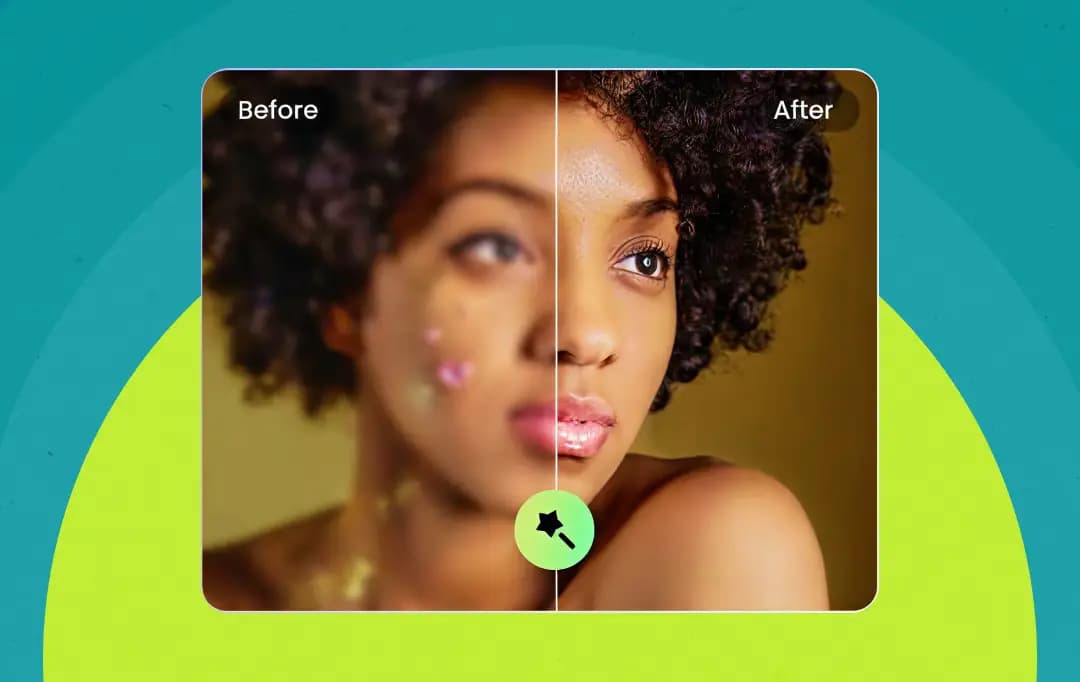 What happens when you upload a photo to an AI enhancer? Here’s a guide explaining how AI image enhancers analyze pixels to sharpen, upscale, and restore images.
I used to think photo enhancement tools were just fancy filters. You upload a blurry image, click a button, and somehow it comes back sharper, almost like the tool guessed what the photo should have looked like.
The first time I tried one on an old, grainy picture, the result honestly felt a little suspicious. How did the tool know where to add details? How did it make the image clearer without the original information?
And here’s where things actually shift: the tool isn’t really guessing. Behind that simple ‘enhance’ button is an AI model trained on millions of images. It analyzes patterns in pixels, like textures, edges, and lighting, and then reconstructs details so the image looks sharper and more natural.
But how exactly does AI image enhancement work? Here’s what I’ve learned about the technology behind AI image enhancement. And to give you a more practical view of the process, I’ve used HitPaw FotorPea as an example along the way. Let’s explore how these tools actually transform a low-quality image into a clearer, more detailed one.
AI Image Enhancement Tools Vs. Photo Editing Software
AI Image Enhancement tools are software powered by artificial intelligence and machine learning models. Instead of you tweaking dozens of sliders to fix exposure, sharpness, and contrast of your photos, these tools enhance your photos in a minute.
They are trained on millions of high-quality images to automatically recognize what a ‘perfect’ photo looks like. So, the AI-powered tools can intelligently correct and upscale your photos without much manual effort.
Here’s how these tools compare against traditional photo editors-
| Feature / Aspect | Traditional Photo Editing Software | AI Image Enhancement Tools |
|---|---|---|
| Learning Curve | Steep Requires time to learn complex tools, layer management, masking, and color theory. |
Minimal to none Intuitive, one-click operations with a near-zero learning curve. |
| Editing Process | Manual Users must meticulously adjust curves, levels, and healing brushes by hand. |
Automated The AI analyzes the specific image data and applies the necessary fixes instantly. |
| Time Efficiency | Time-consuming Detailed restorations or batch edits can take hours of focused work. |
Extremely fast Complex computations like denoising or upscaling happen in mere seconds. |
| Image Upscaling & Repair | Basic Relies on standard pixel interpolation, which can result in pixelated or soft edges when enlarging images. |
Advanced Uses neural networks to predict and generate missing pixels, creating sharp, flawless results. |
| Best Used For | Heavy manipulation, multi-image compositing, graphic design, and absolute creative control. Example: Adobe Photoshop |
Quick touch-ups, rescuing blurry or noisy photos, old photo restoration, and effortless resolution upscaling. Example: HitPaw FotorPea |
What Do AI Image Enhancers Correct and How?
AI image enhancers do not just filter your photos; they understand the actual problem and fix it. So, what all can these digital restoration studios improve and how? Here’s how AI improves image resolution and quality-
1. Image Upscaling using Generative AI
Image enhancement with AI is not about stretching existing pixels. Advanced tools today use Generative AI for image upscale and enhancement. Instead of simply stretching the pixels to fill in the blanks, AI photo enhancers generate new, realistic pixels and textures from scratch. In this manner, these tools are able to recreate the missing details flawlessly.
2. Noise Reduction and Sharpening via Neural Networks
AI-powered image-enhancing tools use neural networks to rescue blurry shots and remove the ugly digital grain from your photos. These networks are smart enough to process visual patterns, just like a human brain. They can easily tell the difference between actual textures and random camera noise. So, these tools can help you smooth out unwanted grain and sharpen blurry edges without making your photos look unnatural.
3. Face Restoration and Color Correction using Machine Learning
AI-powered apps are trained on multiple sets of before-and-after photos through machine learning. So, as the AI has studied millions of human faces, natural textures, and landscapes, it knows exactly what an eye or a smile should look like. So, with its vast visual memory, AI photo enhancers reconstruct damaged facial features and add vibrant, accurate colors back into your captured shots.
How Can You Use AI Image Enhancers to Improve Your Images
So, to give you a clear, practical view of how these tools work in the real world, I am sharing my experience using HitPaw FotorPea Photo Enhancer as an example.
HitPaw recently integrated its powerful AI enhancement APIs directly into ComfyUI, a popular node-based interface for advanced visual workflows. This exciting collaboration bridges the gap between raw AI image generation and professional finishing.
So, you can now use this tool for more professional or advanced use cases. This will allow you to plug HitPaw's studio-quality upscaling and restoration models right into ComfyUI’s custom creative pipelines.
However, if you are an everyday user, you absolutely don’t need to be a node-wiring expert to get these results. You can use HitPaw’s standalone desktop software, which is incredibly straightforward. Here is how I used it to enhance images:
Step 1: I headed over to the official HitPaw FotorPea website and downloaded the tool for my desktop. The installation was quick, and I loved its clean and simple interface. To begin the process, I simply clicked on the ‘Enhance Photos Now’ button.

Step 2: Next, I selected a photo from my desktop and dragged and dropped it into HitPaw’s workspace. The tool accepts all types of images, in any format, so it's perfectly versatile.
Step 3: Once my image was uploaded, I was given a selection of enhancement models. I could choose from the Face model, Upscale model, Denoise model, Blur Repair model, or Colorize model.

Step 4: And just like that, I was done! The AI enhanced my picture significantly! The images generated by this tool can be exported in any desired format.
*Note for advanced creators: You can export the images directly from HitPaw and use them in your ComfyUI workflow.

So, with AI-driven tools like HitPaw FotorPea, achieving professional-grade clarity, repairing damage, or upscaling resolution takes nothing more than a few clicks. Whether you are a casual user or an advanced creator, AI-powered image enhancers have made high-end photo restoration effortlessly accessible to everyone.
Helpful Read: HitPaw AI Photo Enhancer
Practical Use Cases for AI Image Enhancers
Beyond being the fun, futuristic tools for upscaling images, AI image enhancers have a number of practical use cases as well. Here are some of the most common real-world scenarios where AI photo editors can help you-
| Use Case | How Can AI Tools Help |
|---|---|
| Restoring Family History & Genealogy | Bring old, faded, or damaged family photos back to life. AI can automatically repair scratches, sharpen blurry faces, and even add accurate color to black-and-white portraits. |
| E-Commerce & Product Photography | Create professional-looking product images that drive sales. AI easily upscales smartphone photos, ensuring textures like fabric or jewelry look crisp and clear, even on high-resolution screens. |
| Content Creation & Social Media | Rescue candid, once-in-a-lifetime moments that came out blurry or noisy. AI makes low-light or fast-action shots instantly sharp and ready for platforms like Instagram or Pinterest. |
| High-Quality Printing & Merchandising | Prepare any digital image for large-scale printing on canvas, t-shirts, or posters. AI intelligently boosts resolution up to 8K, preventing pixelation and ensuring a flawless print. |
| Real Estate Photography | Make property listings stand out with bright, clean images. AI efficiently removes digital noise and grain common in low-light interior or evening exterior shots, making homes look more inviting. |
Conclusion
So, if we step back and look at how AI image enhancers actually work, the biggest takeaway is that we are no longer just stretching or recoloring existing pixels. We are relying on technology that actually understands what a face, a fabric texture, or a landscape is supposed to look like, allowing the AI to intelligently reconstruct missing details based on learned data.
What makes AI image enhancement tools so effective is how they hide all that staggering mathematical complexity behind a single button. You don't need to understand the intricacies of machine learning or generative models to reap the benefits. The algorithm does the heavy computational lifting in the background, so you can just drop in a flawed photo and watch the technology bring it back to crisp, flawless reality!
Frequently Asked Questions
How does an AI tool improve pixel quality?
AI analyzes surrounding pixels and patterns in the image to intelligently reconstruct missing details. Instead of simply sharpening, it predicts what higher-quality pixels should look like to produce a clearer and more natural result.
Can an AI image enhancer fix blurry images?
Yes, an AI-powered image enhancer can fix blurry images. AI models are trained on large image datasets to recognize blur patterns. They reverse this blur by restoring edges, textures, and fine details that were lost during motion, focus errors, or compression.
What is the best way to enhance image resolution using AI?
The best approach is using an AI upscaling tool like HitPaw FotorPea to preserve details. These tools enlarge the image and generate new pixels intelligently so the image remains sharp instead of stretched or pixelated.
Are AI photo enhancers safe for my photos?
Privacy is a big concern with AI. If you are using a free, cloud-based web tool, your photos are often uploaded to external servers. However, using downloadable desktop software allows you to process the images locally on your own computer. This means your photos stay entirely on your hard drive.

Uncover executable insights, extensive research, and expert opinions in one place.
Related Content