
ClickTime App: How It Handles Time, Expenses, and Approvals
An office is a place where like-minded people put their heads together and pull off tasks that require skills. But then there are many distractions as well, which can significantly slash efficiency.
Thankfully, the technology is there for our rescue!!
With the rapid rise of innovations, there truly is an app to optimize almost every aspect of your life, from waking up with apps like Wake Me Up In, to innovative timesheet apps that encourage employee productivity.
Timesheet app provides several incredible features and functions, which is why employees around the world opt for improved accessibility and ease of use. Relying on an optimized mobile app to help you manage employees is the perfect solution for business owners.
In our ClickTime Mobile review, we have come up with the fantastic features that this app offers to businesses and employees.
What’s the App About?
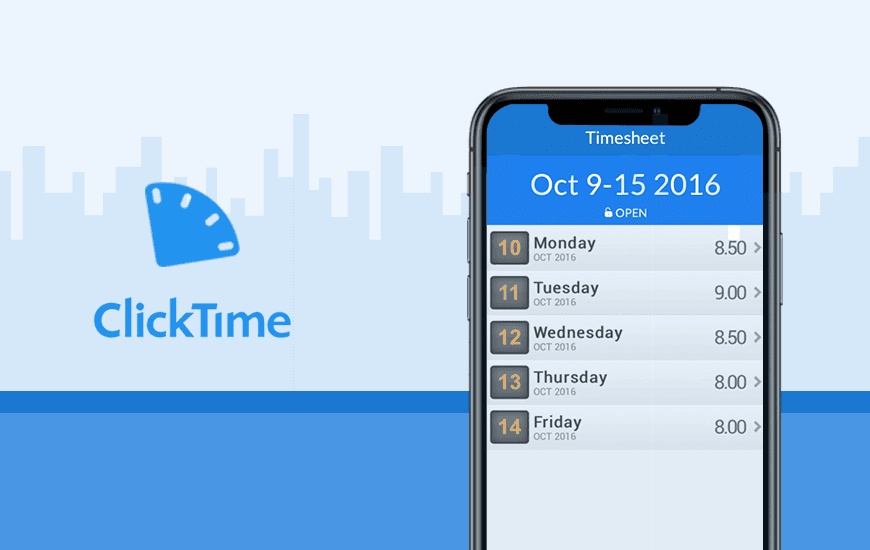
ClickTime Mobile app is an innovative app that streamlines the process of managing the employees and keeps everyone up to date with project details, which drastically boost productivity. It aids the team in having absolute clarity on their responsibilities and tasks and projects can be assigned more appropriately.
The employee timesheet app curates precise visuals of projects and allows the user to take advantage of the ultimate peace of mind associated with error reduction.
While some apps are not entirely compatible with all types of mobile smartphones, this app can be used on Android, iPhone, and every other type of mobile device out there. It allows the employees to enjoy the ultimate ease of use and optimal accessibility at the same time.
More importantly, making use of innovative employee management software apps enable you to focus on other important aspects of managing the business.

Notable Features of ClickTime: Timesheet Mobile App
The timesheet mobile app comes packed with tons of features to aid the productivity of the user and the following are the most notable features:
1. Manage Employees On The Go
Efficient and accurate time tracking is essential for organizing the daily workflow and for that, you need to ensure that the team members are up to date with important tasks. And one of the most notable functions of this employee time tracking app is that it allows you to manage the staff even if you are not in the office.
The employees can monitor their daily tasks, gain clarity on task priority, and track their time off work. As a result, you will not have to deal with countless unplanned absences and missed deadlines.
2. Budget Restrictions
With this app, your business expense sheet will no longer be in jeopardy because the app is quite effective in ensuring that you stay within the project budget restrictions.
The app provides an inbuilt reimbursement feature that is perfect for the employees. It means project budgets and employee payroll will always be free of minor errors that can have massive negative impacts on the business.
Pros and Cons of ClickTime Mobile
Pros
- Comprehensive Time Tracking – Allows tracking of time by clients, projects, and tasks with flexible entry methods like stopwatch, hour entry, or start-end times.
- Expense Tracking on the Go – Users can upload receipts, track expenses, and submit expense sheets while traveling.
- Mobile Timesheet Submissions – Enables employees to submit timesheets and managers to approve or reject them remotely.
- Supports Time Off Management – Users can request and track time off, view holidays, and get approvals through the app.
- Single Sign-On Support – Simplifies login for enterprise users with SSO integration.
Cons
- Requires Active Account – The app can only be used with an active ClickTime account, limiting access for new or casual users.
- Limited Standalone Functionality – Designed as a companion app, it lacks full web platform features.
- Offline Functionality Not Mentioned – May require constant internet access for full functionality.
Notable Features of ClickTime: Time and Expenses
The timesheet mobile app comes packed with tons of features to aid the productivity of the user and the following are the most notable features:
1. Manage Employees On The Go
Efficient and accurate time tracking is essential for organizing the daily workflow and for that, you need to ensure that the team members are up to date with important tasks. And one of the most notable functions of this employee time tracking app is that it allows you to manage the staff even if you are not in the office.
The employees can monitor their daily tasks, gain clarity on task priority, and track their time off work. As a result, you will not have to deal with countless unplanned absences and missed deadlines.
2. Budget Restrictions
With this app, your business expense sheet will no longer be in jeopardy because the app is quite effective in ensuring that you stay within the project budget restrictions.
The app provides an inbuilt reimbursement feature that is perfect for the employees. It means project budgets and employee payroll will always be free of minor errors that can have massive negative impacts on the business.
3. Notifications
Traditional paper timesheets simply cannot be compared to this innovative app that streamlines employee management. While traditional timesheets can easily be misplaced and filled in incorrectly, this timesheet application stores all the data in one secure place.
In addition to this, you and your team members will be able to rely on accurate mobile notifications. You will be notified the second an error is detected, which means you will be able to reduce delays and project errors efficiently.
The inbuilt notification system also keeps you and your employees up to date with projects and task deadlines, while also eliminating the concern of incorrect entries that can ultimately lead to chaos.
4. Mobile Entries
Recording employee hours has never been so simple. While the timesheet tracker app allows you to keep track of the team members on the go, it also authorizes the employees to enter data and record hours worked from their mobile phones.
Improved accessibility is another notable aspect that makes this app stand out. Unlike traditional timesheets, employees can enjoy a drastic reduction in data errors that sometimes affect their income.
5. Report Generating
Generating analytical reports for your business can be an absolute nightmare, especially when taking into account that the process of generating reports for each employee can be extremely time-consuming and error-prone.
Luckily, this handy mobile app provides the perfect solution to minimize this aspect of managing the team. You will be able to easily generate analytical reports for each member of the team in just a few simple clicks. Exporting timesheet data is also a great feature that can help you save important data.

How Much Does the ClickTime Mobile Cost?
To cater to the varied fields, the app comes in various packs and each pack is wrapped with set features. To check the subscription plans of this Clicktime app, take a look at the following plans:
1. Starter Plan
Cost: $9 per user per month
Starter plan includes:
Easy Time Tracking
70+ Reports
Email Reminders
2. Team Plan
Cost: $12 per user per month
Everything in â Starter plan plus:
Approval Workflows
Advanced Billing Rates
Time Off Management
3. Premier Plan
Cost: $24 per user per month
Everything in â Team plan plus:
Project Budgeting
Resource Planning
Utilization Goals
4. Enterprise Plan
Cost: Depends upon the client’s requirements
Everything in â Premier plan plus:
Single Sign-On
Named Account Manager
Custom Integrations
While the small monthly subscription fee relevant for this work timesheet app is incredibly affordable, you can also take advantage of a free trial period in which you can navigate the software and test out the features and functions offered before settling on a subscription.
NOTE: All plans include a 14-day free trial and incredible support.
MAD Verdict
According to a report by The Engagement Institute, due to the lost productivity in the US, the companies collectively lose around $550 billion per year. And the data from the U.S. Bureau of Labor Statistics revealed that even after spending more time at work (8.8 hours) than sleeping, the workplace productivity of the American workers isn’t improving much.
So when there is so much fuss going around productivity and efficiency, an employee time keeping app like ClickTime app makes more sense with features like expense tracker, timesheet tracker, mobile timekeeping, mobile time entry, and more.
During our ClickTime Mobile app review, we found the app highly useful in:
Reducing cost
Improve performance
Timesheet benefits
If you are planning to enhance the overall productivity of your business or office, track your time with this simple timesheet app.
Customer Reviews
How was your experience with the product?