
We are not biased. We test and review every product. Here's our Methodology.

Can Photomath help you learn math instead of just solving problems? This review explores its features, accuracy, and real-world usefulness.

MobileAppDailyCertified Rating
4.3 out of 5
Available on:
Why Trust MobileAppDaily?

For us, Product Reviews mean diving headfirst into the functionality of each digital product, whether it's an app, software, or website. Our process centers around hands-on testing of each tool we pick. From scrutinizing features to testing vulnerabilities of security standards, the goal remains to help you find products that don't just work but truly elevate your experience. In a nutshell, if we're recommending a product, it's because we believe it'll genuinely make your digital life easier.

  • Products Reviewed - 4,000+
  • No. Of Experts - 20+
  • Categories - 65+
Explore Our Methodology
Riya

Written By Riya

Riya turns everyday tech into effortless choices! With a knack for breaking down the trends and tips, she brings clarity and confidence to your downloading decisions. Her experience with ShopClues, Great Learning, and IndustryBuying adds depth to her product reviews, making them both trustworthy and refreshingly practical. From social media hacks and lifestyle upgrades to productivity boosts, digital marketing insights, AI trends, and more—Riya’s here to help you stay a step ahead. Always real, always relatable!

Explore More By Author

Photomath Review: Does This AI App Make You Better at Math or Just Faster?
Photomath

Staring at a math problem like it personally wronged us, completely unsure where to even begin, this feeling is more universal than most of us will ever admit. That's exactly the gap Photomath set out to close.

Point your camera at any problem, and the app not only gives you the answer but also walks you through every step of how it got there. No tutor needed, no frantic Googling, no giving up.

But does it actually work as well as it sounds? I put this math solver app through its paces, from basic arithmetic to multi-step equations, to find out whether this is a genuine learning tool or just a shortcut dressed up in a clean interface. Here's my honest Photomath review.

Pros and Cons of Photomath

Pros

  • Instant camera-based scanning, point, shoot, and get a step-by-step solution in seconds
  • Covers a wide range, including arithmetic, algebra, geometry, trigonometry, statistics, and calculus
  • Functional free version with no mandatory sign-in or hidden charges
  • Works offline, making it useful without a stable internet connection
  • Available in 32 languages, making it accessible to a global student base Available in 32 languages, making it accessible to a global student base

Cons

  • Camera recognition can struggle with handwritten or messy problems, leading to occasional misreads
  • Struggles with highly complex equations and upper-level college math
  • Free tier is limited; full step-by-step explanations require a paid subscription
  • No option to save questions or download solutions for offline study review

A Closer Look at Photomath Features

Photomath keeps things straightforward and extremely simple. All that you need to do is scan a problem, get a solution, and actually understand how you got there. As one of the best math apps, it covers everything from basic arithmetic to college-level calculus, making it easier for students to learn at their own pace. Here's a closer look at the Photomath features that make that possible-

1. Camera-Based Problem Scanning

The core of the Photomath app is to point your camera at any printed or handwritten problem, and Photomath reads and solves it instantly. It works with textbook problems, worksheets, and even word problems, making it genuinely useful across different study scenarios.

2. Step-by-Step Explanations

Photomath doesn't just hand you the answer; it breaks down the solution into individual steps so you can follow the logic at your own pace. Basic step-by-step explanations are available on the free plan, with deeper “how” and “why” tips unlocked on Photomath Plus.

3. Animated Steps

A more recent addition, Animated Steps, shows the exact progression of a particular step through bite-sized animations rather than static text. It's particularly helpful for visual learners who need to see a move happen, not just read about it, and it's available for free.

4. Multiple Solution Methods

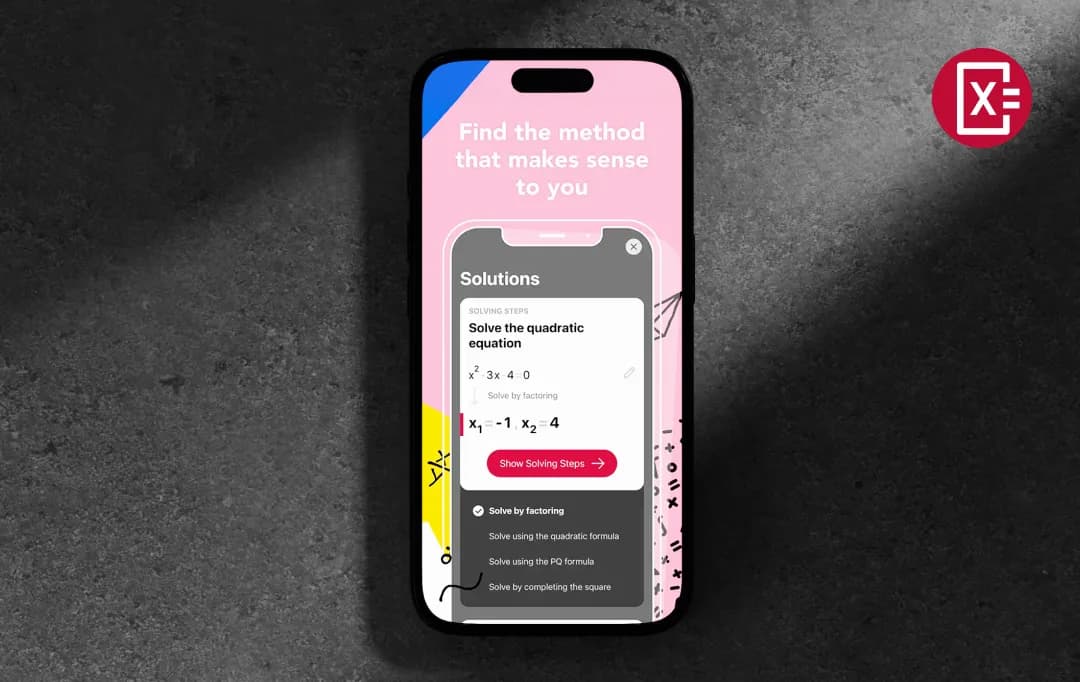
For many problems, Photomath offers more than one way to reach the answer, letting you pick the method that matches what your teacher taught or what you understand best. This is especially useful in algebra, where different approaches can lead to the same result.

5. Smart Calculator

Beyond the camera scanner, Photomath includes a built-in scientific calculator for manually typing in problems. It supports complex expressions and functions, making it a capable standalone calculator for situations where scanning isn't practical.

6. Interactive Graphs

When a problem involves graphing, functions, equations or inequalities, Photomath renders an interactive graph alongside the solution. You can visualize what the math actually looks like, which adds real context beyond numbers on a page.

7. Wide Subject Coverage

Photomath covers numbers and quantity, algebra, functions, trigonometry and angles, sequences, geometry, and calculus, spanning elementary school through college level. That breadth makes it useful well beyond basic homework help.

8. Offline Functionality

The app works without an internet connection, so it remains useful in low-connectivity situations like commutes, classrooms with restricted Wi-Fi, or late-night study sessions where you'd rather not depend on a stable signal.

9. Multilingual Support

Photomath is available in English and 31 additional languages, including Arabic, French, Spanish, Hindi, Japanese, and Portuguese, making it accessible to students across a genuinely global user base.

Photomath Pricing 

Photomath solver keeps things simple with a free-forever plan and one premium tier, Photomath Plus, available on monthly or annual billing. Here's exactly what you get at each level:

Plan Price Best For
Basic $0 / Free Casual users & quick answer checks
Plus (Monthly) $9.99 / month Students who want flexibility
Plus (Annually) $69.99 / year ($5.83/mo) Regular learners, best value

Who is Photomath Suitable For?

Photomath AI isn't just a tool for struggling students; it's built for anyone who engages with math, at any level. So, different users can use Photomath on PC or on their mobile devices. Here’s who this platform can help-

User Persona How Photomath Helps
School Students (Middle & High School) Scan homework problems instantly, follow step-by-step solutions, and understand concepts rather than just copying answers. Great for algebra, geometry, and trigonometry.
College Students Tackle entry-level calculus, statistics, and linear algebra with guided solutions. Best suited for foundational college math rather than highly advanced coursework.
Parents Helps parents who are out of practice brush up on math concepts so they can actually guide their kids through homework, not just hand them a calculator.
Teachers & Educators Use it as a classroom demonstration tool to walk through problem-solving steps visually. Photomath even offers guidance on incorporating it into lesson plans.
Exam Preppers Review previously scanned problems, bookmark tricky questions, and use step-by-step breakdowns to solidify understanding before tests.
Non-English Speakers With support for 30+ languages, students across the globe can access math help in their native language, no language barrier, no problem.
Students Who Missed Class Catch up on missed lessons independently using detailed, self-explanatory steps, no tutor needed.

Customer Reviews

Checking...

Rate the product based on your experience?

How was your experience with the product?

Also Reviewed By Us

MobileAppDaily’s Ratings for Photomath

Expert Opinion
Feature

FEATURE

4.4

Camera scanning, animated step-by-step explanations, interactive graphs, multiple solving methods, and a smart scientific calculator, all covering elementary through college-level math.

Pricing

PRICING

4.0

Free tier is genuinely functional for basic solving, with Plus at $9.99/month or $69.99/year for full access. No student discount, but the annual plan offers solid value compared to hiring a tutor

Performance

PERFORMANCE

4.2

Fast and reliable for printed problems, camera recognition can stumble on messy handwriting or complex formatting.

UI/UX

UI/UX

4.5

Clean, minimal interface with no mandatory sign-in and a straightforward scan-solve-learn flow that works for all age groups. Navigation is intuitive, though some advanced features take a moment to discover

How Does Photomath Work?

Photomath AI’s features take the frustration out of math by turning your smartphone camera into an instant problem solver. With a simple Photomath app download, students can access step-by-step solutions anytime, anywhere.

Whether you're stuck on algebra homework or prepping for an exam, the process is designed to be fast, intuitive, and, most importantly, educational. Here's how it works, step by step:

Step 1: Scan the Problem

Open the Photomath app and point your camera at any printed or handwritten math problem. The app's AI-powered image recognition automatically detects and frames the equation on your screen. You can also manually type in a problem using the built-in smart Photomath calculator if you prefer.

Step 2: Instant Recognition

Once the problem is captured, the Photomath solver online processes it in real time. The AI identifies the type of problem, whether it's a simple fraction, a quadratic equation, or a calculus integral, and selects the most appropriate solving method.

Step 3: Get the Solution

A solution appears almost instantly. For many problem types, Photomath AI offers multiple solving methods to choose from. The app gives you the flexibility to learn your teacher's approach or explore alternative techniques.

Step 4: Learn Through Each Step

This is where the Photomath solver truly stands apart. Rather than just giving you the answer, it breaks the solution down into individual steps. On the Plus plan, each step comes with custom visual aids and "how & why" explanations so you genuinely understand the logic behind every move.

Step 5: Review & Bookmark

You can scroll back through your previously scanned problems, bookmark tricky questions for later, and use them as study material when preparing for tests or catching up on missed lessons.

Photomath vs. Alternatives 

The online Photomath tool is a strong contender in the math-solving space, but it's not the only option. Here's how it stacks up against two of its closest rivals, Mathway and Gauthmath:

Criteria Photomath Mathway Gauthmath
Primary Input Method Camera scan / manual typing Manual typing only Camera scan / manual typing/desktop calculator
Step-by-Step Solutions Yes (basic free; detailed on Plus) Yes (paid only) Yes (free with daily limits; full on paid)
Free Plan Usefulness Moderate, solves & shows basic steps Limited, answer only, no steps Good, up to 11 problems/day with steps
Pricing Free / $9.99 per month / $69.99 per year Free / $9.99 per month Free / $11.99 per month (3-day trial)
Topics Covered Arithmetic → entry-level college math Arithmetic → advanced college math Math, physics, chemistry, biology, coding & more
Human Tutor Support No No Yes, live tutors available in-app
Offline Access Yes (basic features) No No
Language Support 30+ languages English only Multiple languages
Platform Availability iOS & Android iOS & Android iOS, Android & Desktop
Privacy Considerations Google-owned, standard data practices Standard Owned by ByteDance (TikTok's parent company), raised privacy concerns for some users and schools
Best For School students who want guided learning Advanced math students Students who need AI + human tutor backup

MobileAppDaily’s Final Verdict for Photomath

The MobileAppDaily team came away from this review largely impressed with what the platform delivers, especially for the price. Based on the Photomath reviews collected from the team, here’s what the team appreciated. The scan-to-solution experience is smooth, the animated steps make the learning process more visual and intuitive than most rivals manage, and wide language support means it genuinely works for a global student audience.

Among the growing category of calculator apps, Photomath stands out by combining quick solutions with clear explanations that help users understand the logic behind every step.

For anyone from middle school through early college who finds math intimidating, Photomath removes enough friction to make independent problem-solving feel achievable. Where it falls short is predictable but worth flagging.

The camera can misread handwritten problems, advanced college math is outside its comfort zone, and the free plan is functional but limited enough that regular users will hit a wall.

There's also no student discount, which feels like an oversight for an app built almost entirely around student use cases.

Still, for what it sets out to do, make math less stressful and more understandable for everyday learners, Photomath delivers. It's not a replacement for actually learning the material, but as a study companion that meets you where you are, it's one of the better options in a crowded space.

Let Your Product Take the Center Stage with Our Review

Share your product details and our team will get back with the next steps.

Photomath
Frequently Asked Questions

FAQ
  • What is Photomath?

    The Photomath online calculator helps students solve math problems using their smartphone camera. It provides instant, step-by-step solutions across topics ranging from basic arithmetic all the way to calculus.

  • How does Photomath work?

    Simply open the app, point your camera at a printed or handwritten math problem, and Photomath instantly scans and solves it. It then breaks down the solution into clear, step-by-step explanations so you can understand the method — not just the answer.

  • Is Photomath free?

    Yes, Photomath has a free plan that covers basic step-by-step solutions. For deeper explanations, custom visual aids, and "how & why" tips, you can upgrade to Photomath Plus at $9.99/month or $69.99/year, with a 7-day free trial available.

  • Is Photomath accurate?

    Photomath is highly accurate for standard school-level math, from arithmetic through to entry-level college topics. However, accuracy can dip on more advanced problems like complex integrals, and the camera occasionally misreads problems if handwriting is unclear or lighting is poor.

  • Who owns Photomath?

    Photomath was founded in 2014 by Damir Sabol and was acquired by Google in 2023. It continues to operate as a standalone app, though there are plans to progressively integrate its technology into other Google products like Google Lens and the Gemini AI assistant.

Delve into our comprehensive yet easy-to-consume guides, which provide insights that help scale business faster and prevent unseen pitfalls.

Related Products

Cut through the clutter and explore related digital products that deliver on performance.