We are not biased. We test and review every product. Here's our Methodology.

Monday.com is packed with features, but are they actually useful? Read our review to find out what works, what doesn't, and what surprised us.

MobileAppDailyCertified Rating
4 out of 5
Available on:
Why Trust MobileAppDaily?

For us, Product Reviews mean diving headfirst into the functionality of each digital product, whether it's an app, software, or website. Our process centers around hands-on testing of each tool we pick. From scrutinizing features to testing vulnerabilities of security standards, the goal remains to help you find products that don't just work but truly elevate your experience. In a nutshell, if we're recommending a product, it's because we believe it'll genuinely make your digital life easier.

  • Products Reviewed - 4,000+
  • No. Of Experts - 20+
  • Categories - 65+
Explore Our Methodology
Riya

Written By Riya

Riya turns everyday tech into effortless choices! With a knack for breaking down the trends and tips, she brings clarity and confidence to your downloading decisions. Her experience with ShopClues, Great Learning, and IndustryBuying adds depth to her product reviews, making them both trustworthy and refreshingly practical. From social media hacks and lifestyle upgrades to productivity boosts, digital marketing insights, AI trends, and more—Riya’s here to help you stay a step ahead. Always real, always relatable!

Explore More By Author

Monday.com Review: I Tested It Beyond Its Pretty Interface and Colorful Boards
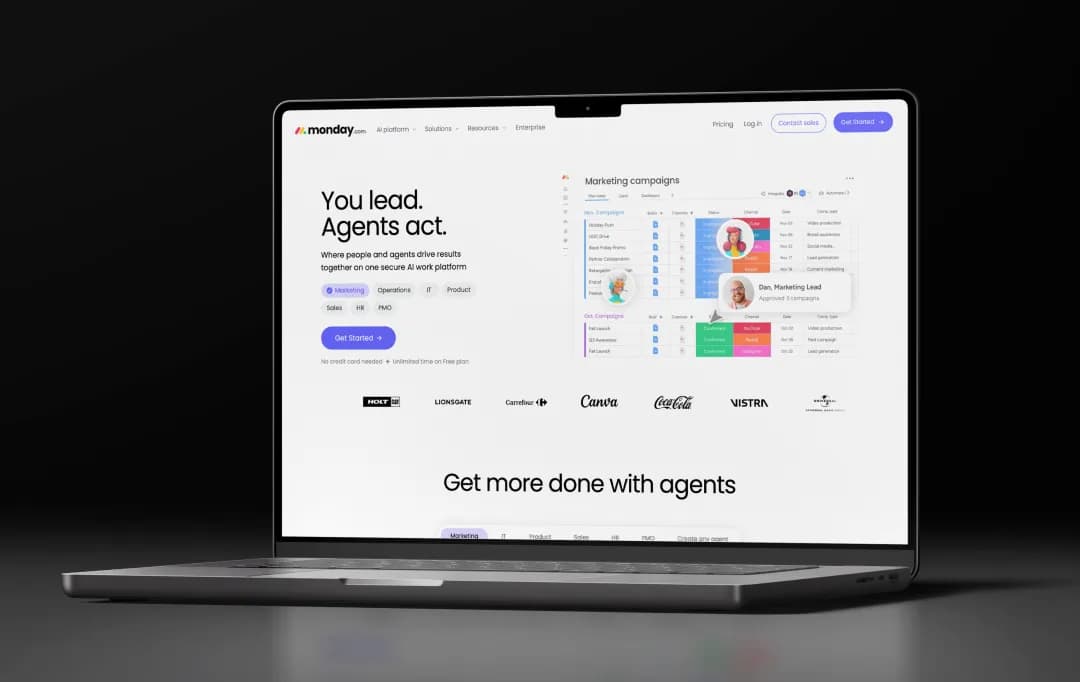
Monday.com

Think about your team's actual workflow for a second. There's the project management tool everyone signed up for with good intentions. The Slack channel that's basically a graveyard of “circling back on this.” The spreadsheet someone built in 2022 that half the team doesn't even know exists anymore.

And somehow, despite having five different places to track work, nobody can answer a simple question: “How far did we get with the project?”

That's the exact chaos Monday.com claims it can fix. One platform, the pitch goes, where your tasks, timelines, and conversations all live together instead of being scattered across a dozen tabs. It's a bold promise, and one you've probably seen a hundred times in ads that are as colorful as they are confident.

So I decided to actually test it. Not just skim the features page, but dig into whether the platform genuinely simplifies how teams work, or if it's just another tool that looks great in a demo and falls apart in daily use. So, here’s my comprehensive Monday.com review, covering all the necessary details about the platform.

Pros and Cons of Monday.com

Pros

  • Highly visual, customizable boards that adapt to different workflows without coding
  • Strong automation engine for repetitive tasks like status updates and notifications
  • 200+ integrations across marketing, communication, collaboration, and development tools
  • Multiple views, Kanban, Gantt/Timeline, Calendar, Chart, for the same data
  • AI features (AI blocks, Sidekick assistant, AI agents) built into paid plans
  • Free plan available for individuals or very small teams

Cons

  • Automations and integrations are locked behind paid plans and are not available on Basic
  • Paid plans require a minimum of 3 seats, so solo users and pairs pay more than the per-seat price suggests
  • Can get expensive as teams and automation needs scale up
  • Learning curve for teams unfamiliar with “Work OS”, style platforms

What Does Monday.com Offer?

Monday app’s feature set goes well beyond basic task boards; it now spans workflow automation, native AI agents, and portfolio-level reporting. Here's what stands out.

1. Customizable Boards with Dependencies and Sub-Items (4.5/5)

Boards support column types for status, timelines, formulas, and people, plus task dependencies and sub-items for breaking work into stages. Views range from Kanban and Gantt/Timeline to Calendar, Workload, and Chart, so the same data can be read as a sprint board, a critical path, or a capacity plan.

2. Workflow Builder (4.5/5)

A visual, no-code canvas for mapping multi-step, cross-functional processes (e.g., Sales → Ops → Finance approvals) with branching logic, smart conditions, and SLA-based escalation, going beyond simple single-trigger automations to model entire business processes.

3. AI Blocks (4.3/5)

Modular AI functions that plug into the Workflow Builder, classic Automations, or individual columns to summarize text, classify requests, extract fields from documents, or propose next actions, turning ambiguous, judgment-based steps into repeatable automation.

4. Monday Sidekick (4.2/5)

A context-aware AI assistant that understands your actual boards, statuses, and documentation (not a generic chatbot), used for tasks like generating executive summaries, debugging automation formulas, and suggesting workflows tailored to your setup. It's included in the Standard plan, with a fuller "Plus" tier on Pro and Enterprise.

5. AI Agents (Agent Builder / Agent Factory) (4.2/5)

Monday AI offers autonomous digital workers that run processes end-to-end, monitoring boards, applying judgment based on defined rules, and taking action (routing requests, chasing updates, triggering next steps) even when no one is actively working, within the permission boundaries you set.

6. Automations Engine (4.0/5) 

No-code automations for status changes, notifications, and recurring tasks, with monthly action limits that scale sharply by plan, from none on Basic to 25,000/month on Pro and 250,000/month on Enterprise.

7. Dashboards and Portfolio Reporting (4.0/5)

Cross-board dashboards aggregate data from multiple projects into a single real-time view for tracking budgets, timelines, and risk, with true portfolio and resource management reserved for the Enterprise tier.

8. Workload and Resource Management (4.3/5)

Monday software’s visual workload views show who's over- or under-allocated across boards, helping managers rebalance assignments before deadlines slip, rather than just tracking task status in isolation.

9. Monday MCP (Model Context Protocol) (3.9/5)

An official MCP server that lets external AI tools, including Claude, ChatGPT, and Copilot, read and write monday.com data directly, while still enforcing the same row-level permissions users already have.

10. Product Lifecycle Management (Monday dev) (4.0/5)

Through the Monday dev product, allows teams to streamline product lifecycle management. Right from roadmapping, backlog prioritization, sprint planning, bug and incident tracking, to releases.

Visual roadmaps link individual tasks and epics to quarterly goals, while burndown charts, velocity metrics, and two-way GitHub/GitLab integrations give engineering and product teams delivery visibility without needing a separate tool like Jira.

11. Integrations

Monday.com integrations support over 200+ native integrations across marketing, communication, collaboration, and development tools (Slack, Gmail, Microsoft Teams, Outlook, Zoom, Google Drive), letting Monday.com sit at the center of an existing tool stack rather than replacing it.

12. WorkForms, Docs, and Canvas

Custom intake forms feed directly into boards, real-time collaborative docs support planning and write-ups, and Canvas provides a whiteboard for brainstorming, keeping planning and execution in the same platform.

13. Time Tracking and Budgeting

A dedicated time-tracking column (manual or timer-based) ties logged hours to tasks and boards for budget tracking, available from the Pro plan onward.

Understanding Monday.com Pricing

Unlike most project management tools, Monday.com uses seat-based pricing across 5 different tiers billed monthly or annually. Monday.com’s free plan is genuinely useful to test out the tool before committing full time. Here’s an overview of Monday pricing-

Plan Price (Billed Annually) Best For Key Limitations
Free $0 (up to 2 seats) Individuals or pairs testing the platform No automations, integrations, or Timeline/Gantt view
Basic $9/seat/month Small teams needing simple task tracking No automations or integrations
Standard $12/seat/month Most small-to-mid-sized teams Automations and integrations are capped at 250 runs/month
Pro $19/seat/month Teams needing advanced automation and reporting No portfolio or resource management
Enterprise Custom pricing Large organizations requiring advanced security and governance Requires contacting sales for pricing
  • Monday Service pricing starts at $31/seat/month for the standard plan, and it goes up to $45/seat/month for the Pro plan
  • Monday Dev pricing starts at $9/seat/month and goes up to $20/seat/month for the Pro plan.
  • Monday CRM pricing starts at $12/seat/month and goes up to $28/seat/month for the Pro plan. The ultimate plan comes with custom pricing.

*This is the recent pricing as of July 2026. For further pricing information, visit Monday.com

Monday.com Solutions

Beyond generic project boards, Monday project management tool packages its platform into dedicated solutions for specific teams and functions, each with tailored templates, dashboards, and AI agents. Here's how the core solutions break down.

Team / Function What monday.com Offers How It Helps
PMO (Projects & Delivery)
  • Gantt charts
  • Dependencies and milestones
  • Critical path analysis
  • Portfolio-level dashboards
  • PMO-focused AI agents that track tasks and flag blockers
  • Gives PMOs a centralized view across multiple projects to govern delivery, spot risks early, and report portfolio status to stakeholders without manual roll-ups
Marketing (Campaigns & Creative)
  • Campaign planning boards
  • Content calendars
  • Creative approval workflows
  • AI agents that draft campaign plans
  • Generate assets and route approvals
  • Connects campaign work to brand assets and timelines in one place, helping teams launch faster while keeping creative direction and approvals in human hands
Operations (Processes & Efficiency)
  • No-code workflow automation
  • Process templates
  • Cross-departmental dashboards for tracking recurring operational tasks
  • Cuts down on manual, repetitive process work and gives operations leaders real-time visibility into where processes are breaking down
IT (Tickets & Support)
  • Monday service module for ticket management
  • SLA tracking
  • IT agents that catch and triage tickets automatically
  • Speeds up issue resolution and escalation so IT teams can focus on infrastructure instead of manually sorting incoming requests
HR (Hiring & Onboarding)
  • Recruitment pipelines
  • Onboarding checklists
  • HR agents that can post job roles
  • Screen candidates and schedule interviews
  • Standardizes hiring and onboarding steps across the organization, reducing time-to-hire and inconsistent onboarding experiences
Sales (Pipeline & Deals)
  • Monday CRM for pipeline tracking
  • Deal stages
  • Sales agents that find leads, send follow-ups, and update the pipeline automatically
  • Keeps deal data current without manual entry, helping reps spend more time selling and less time updating spreadsheets

Who Is Monday.com For (and not)

Monday.com is one of the most flexible CRM software, and is thus usable across many team types, but it's a stronger fit for some than others. Here are the personas where Monday fits excellently and a few where it does not.

Team Type Good Fit? Why
Non-technical teams wanting an intuitive, visual tool Yes Drag-and-drop boards and 200+ templates need no coding or IT setup
Operations teams with recurring workflows Yes Strong automation engine cuts down on manual, repetitive process work
Small-to-mid marketing or creative teams Yes Customizable boards, forms, and docs suit campaign and content workflows
PMOs managing complex, multi-project portfolios Conditionally Needs the Enterprise plan for portfolio and resource management features
Freelancers or solo users Not ideal The Free plan is limited, and the 3-seat minimum makes paid plans costlier than solo-focused tools
Teams needing strict budget control at scale Not ideal Automation limits and per-seat costs can climb quickly as teams and needs grow

Customer Reviews

Checking...

Rate the product based on your experience?

How was your experience with the product?

Also Reviewed By Us

MobileAppDaily’s Ratings for Monday

Expert Opinion
Feature

FEATURE

4.0

Unlimited boards and items, plus a genuinely deep automation/integration layer once you're on Standard or Pro, make it one of the most capable tools in its category.

Pricing

PRICING

4.0

Listed per-seat rates ($9–$19/seat/month) look reasonable until the 3-seat minimum and mandatory AI credit add-ons push the real floor higher.

Performance

PERFORMANCE

3.9

Core board and workflow functions run reliably for most day-to-day use, but a meaningful share of reviewers describe bugs, freezing, and unfinished features as they scale up usage.

UI/UX

UI/UX

4.0

The interface is polished and easy to pick up for basic project tracking, with reviewers regularly praising the modern, motivating design; the experience turns sharply negative around account management.

Monday.com Alternatives

Monday is only one of the popular names among many other workflow management tools. There are multiple Monday alternatives that might perform better based on your requirements. Here’s a quick comparison of monday.com with 2 of its key competitors in the market: Asana and ClickUp.

Basis monday.com Asana ClickUp
Entry Pricing (paid, annual) Basic $9/seat/month (3-seat minimum) Starter $10.99/user/month Unlimited $7/user/month
Free Plan Up to 2 seats, 3 boards Up to 10 users, including timeline view and custom fields Unlimited users, unlimited tasks (feature-limited)
Native Time Tracking Only from the Pro plan ($19/seat/month) Added in 2025, gated to a paid plan, less feature-rich Included on lower tiers with billable rates and timesheets
Automation Limits Capped by plan, 250/month on Standard, 25,000/month on Pro, 250,000/month on Enterprise Unlimited automation actions on paid plans Highly customizable, condition-based automations
AI Approach Full AI platform: AI Blocks, Sidekick assistant, autonomous Agents, and monday MCP for external AI tools AI Studio for building custom AI workflows, plus autonomous "AI Teammates" ClickUp Brain: task summarization, workspace Q&A, and automation suggestions (paid add-on)
Ease of Use / Learning Curve Easiest to learn and adopt for non-technical teams Clean, structured, and predictable, though features like Goals are less discoverable Steepest learning curve due to deep customization and hierarchy
Best Fit Visual, cross-functional teams and client-facing dashboards Structured, process-driven teams wanting predictable workflows Technical teams and agencies wanting an all-in-one tool at a lower price

So, in short, choose:

  • Monday.com if visual dashboards and ease of adoption matter most
  • Asana if you want structure with minimal setup
  • ClickUp if budget and feature depth matter more than initial simplicity

MobileAppDaily’s Final Verdict on Monday.com

After going through Monday.com's features, pricing, and AI capabilities in detail on my own, I handed my research over to my team and let them weigh in with their own take, based on everything covered in this Monday.com review. Here's what they had to say.

The Monday app earns its reputation as one of the most approachable “Work OS” platforms out there, and after going through its board system, automation engine, and rapidly expanding AI stack, it's easy to see why so many non-technical teams gravitate toward it.

The visual boards genuinely do make onboarding painless; the Workflow Builder and AI Blocks add real depth for teams that outgrow simple task lists. For cross-functional teams that need dashboards clients and execs can understand at a glance, it's hard to beat.

That said, we can't ignore where the platform gets frustrating. The pricing structure feels engineered to nudge you upward at every turn; automations and integrations are missing entirely from Basic, time tracking waits until Pro, and the 3-seat minimum means even a two-person team pays for a phantom user.

Add in AI credit consumption that now applies to agents on Pro and below, and costs can climb faster than the advertised per-seat price suggests, especially for teams that lean heavily on automation or AI.

Taken together, our team's verdict is that Monday.com is a strong, well-rounded choice for visual, cross-functional teams that value ease of adoption and are willing to pay for the higher tiers to unlock its real strengths, but it's not the most affordable or simplest option if your team is small, budget-conscious, or just needs straightforward task tracking.

If that's you, it's worth weighing it against other project management tools before committing.

Let Your Product Take the Center Stage with Our Review

Share your product details and our team will get back with the next steps.

Monday.com
Frequently Asked Questions

FAQ
  • How do I make a weekly schedule template on Monday.com?

    Create a board using one of monday.com's 200+ templates (or start from scratch), add a column for dates or a Timeline column, and lay out each day's tasks as items with owners and statuses. Switch to the Calendar view to see the week at a glance, and set up automations to send reminders or shift tasks forward automatically.

  • Is monday.com free?

    Yes, monday.com offers a genuinely free forever plan, but it's capped at 2 seats and 3 boards, with no automations, integrations, or timeline/Gantt view. It's useful for solo users or pairs testing the platform, but most growing teams will need a paid plan.

  • Does monday.com offer a free trial on paid plans?

    Yes, signing up automatically starts a 14-day free trial of the Pro plan, giving you access to features like time tracking, private boards, and higher automation limits before you commit. Free trials can't be extended, so you'll need to upgrade or downgrade to the Free plan once it ends.

  • Can I cancel or downgrade my monday.com plan anytime?

    Yes, you can upgrade, downgrade, or cancel your subscription at any time from your account's billing settings. Changes apply according to your billing cycle, so it's worth checking how prorating works for annual plans before switching.

  • Does monday.com integrate with Slack and Google Workspace?

    Yes, monday.com natively integrates with Slack, Gmail, Google Drive, Microsoft Teams, Outlook, and Zoom, among 200+ other tools. These integrations let you sync notifications, files, and updates without leaving your existing communication tools.

Delve into our comprehensive yet easy-to-consume guides, which provide insights that help scale business faster and prevent unseen pitfalls.

Related Products

Cut through the clutter and explore related digital products that deliver on performance.