
Qwen AI Review: A Closer Look at One of the Fastest-Growing AI Models
Qwen is good enough to be useful and inconsistent enough to be dangerous.
That's not a soundbite, it's a working summary after a few weeks of pushing it through research tasks, document analysis, and the kind of multi-step thinking most general users actually need from an AI.
There are things it does better than other AI tools you're already paying for. There are also moments where it confidently invents facts in a way that would have you re-reading the source three times, wondering if you missed something.
So I decided to put this Qwen AI review together to give you a clearer picture of what the tool actually is, before you give it a shot. Here's the honest breakdown.
Pros and Cons of Qwen AI
Pros
- Supports 119 languages and dialects, making it one of the most multilingual AI platforms available today
- All Qwen3 AI models are released under the Apache 2.0 open-source license, allowing free commercial use and modification
- The Hybrid Thinking Mode lets users switch between deep reasoning and fast responses, giving real control over speed vs. accuracy
- Truly end-to-end multimodal, handles text, images, video, and real-time audio input/output in a single platform
- Deep Research and MCP tool integration are built right into the chat interface; no third-party workarounds needed
Cons
- The free API tier is restricted to the Singapore region only, which is a significant barrier for global developers
- The sheer number of model variants (from 0.6B to 235B) can overwhelm newcomers with no clear guidance on which to pick
- Despite its open-source push, third-party app integrations and ecosystem maturity still lag behind established AI models
Qwen AI Features that Stood Out For Me
Qwen is not built as another ChatGPT alternative. It is a unique AI model which has been engineered with some genuinely useful features. Here’s a list of features that were the differentiators for me-
1. Hybrid Thinking Mode (4.8/5)
Most tools that I have used either think slow and deep or too fast and shallow. But Qwen’s hybrid mode is different. It offers a Thinking Mode that lets you toggle between a ‘Thinking’ mode for complex, multi-step reasoning and a ‘Non-Thinking Mode’ for when you need quick answers.
The model does not just switch speed; it actually modifies how it structures its response. If you are a developer building cost-sensitive apps or someone who needs deliberate reasoning, this mode will be genuinely useful.
2. 119-Language Multilingual Support (4.7/5)
Qwen’s multilingual support is more than just about translating text across multiple languages. The Qwen 3 AI models were trained on 36 trillion tokens across 119 languages and dialects. This means that, along with understanding the language, the AI understands the cultural and contextual nuances within that language.
In my experience, this feature can be meaningful for global teams or anyone targeting non-English markets.
3. Qwen3-Coder (4.8/5)
Qwen3-Coder understands complex existing codebases, implements fixes, and passes pre-written tests. It's not just good at writing boilerplate; it reasons through architecture. Pair that with 81.5 on AIME 2025 for mathematical reasoning, and it becomes a great option for developer workflows.
4. Deep Research (4.5/5)
Qwen’s Deep Research feature goes beyond your usual web search. This AI tools automatically browse through multiple sources, synthesize relevant information, and deliver a structured report for the query.
Now, why this feature specifically stood out for me was that it didn't require me to add any plugins. Plus, it prioritizes authoritative references over SEO-heavy fluff. However, it's not the best-suited tool for hyper-niche topics, but for most research tasks, it stands on solid ground.
5. Real-Time Voice & Video Chat (Qwen-Omni) (4.4/5)
Qwen2.5-Omni accepts text, images, video, and audio as simultaneous inputs and can respond in both text and natural audio. In simpler terms, it lets you hold a live voice conversation while displaying a document. It can process multiple inputs together. Its low-latency design makes it viable for real-world use cases like video tutoring or audio-first interfaces.
6. Image Generation (Wan 2.1) (4.3/5)
Qwen's image generation is powered by Wan 2.1, Alibaba's own model. What I liked about this feature is that it handled all my prompts well. It did not just give me a generic scene, but paid attention to all the details. As great as the image generation was, theQwen AI video generator capability (text-to-video) is still maturing.
Worth noting: it also supports image editing, not just generation from scratch.
7. MCP Tool Integration & Artifacts (4.6/5)
Model Context Protocol (MCP) support inside Qwen Chat can help you connect to external services, pulling live data, running code, or interacting with third-party tools without leaving the interface.
The Artifacts feature complements this nicely: it generates standalone, rendered outputs like code snippets, mini web apps, and formatted documents that you can actually use rather than just copy-paste. Together, these two features push Qwen closer to agentic territory than most consumer-facing AI tools.
What All Can You Do With Qwen AI?
From the list of features, it is absolutely clear that the tool is versatile enough to perform across multiple divisions. Whether you're a student, developer, marketer, researcher, or business professional, the Qwen AI app can help automate tasks, generate content, and accelerate decision-making.
Some of the key things you can do with Qwen AI include:
| Use Case | Description |
|---|---|
| Content Creation | Generate blogs, articles, emails, social posts, and marketing copy in seconds. |
| Content Editing | Rewrite, summarize, expand, or improve existing content for clarity and tone. |
| Research & Summarization | Extract key insights from lengthy documents, reports, and online resources. |
| Coding Assistance | Write code, debug errors, explain functions, and accelerate software development. |
| Image Analysis | Understand images, screenshots, charts, and visual content through AI-powered analysis. |
| Data Interpretation | Analyze information, identify patterns, and generate actionable insights. |
| Problem Solving | Tackle complex reasoning, math, and logic-based tasks with step-by-step solutions. |
| Report Generation | Create business reports, proposals, meeting notes, and professional documents. |
| Presentation Drafting | Develop presentation outlines, slide content, and speaking points quickly. |
| Educational Support | Explain concepts, create study notes, and assist with learning across subjects. |
| Workflow Automation | Automate repetitive tasks and streamline multi-step business processes. |
| Translation & Localization | Translate content across languages while preserving context and meaning. |
| Brainstorming Ideas | Generate ideas for marketing campaigns, products, content, and creative projects. |
| Customer Support Assistance | Draft responses, answer FAQs, and help manage customer interactions. |
| Productivity Enhancement | Reduce manual work and complete everyday tasks more efficiently. |
Understanding Qwen API and Qwen Agent
While reviewing the platform, this was one of those sections I almost skimmed past. APIs and agent frameworks are generally not a part of my daily workflow. But the more I looked into what Qwen AI by Alibaba was actually offering here, the more it made sense to understand it properly.
I. The Qwen AI API
The API lives on a platform called DashScope, which is Alibaba Cloud's model hosting service. You send it a request, it runs your prompt through a Qwen model, and sends back a response.
The not-so-standard part about the API is that it supports an OpenAI-compatible interface. So, if you already have code talking to GPT, you migrate to Qwen by changing just three simple things:
- The API key
- The base URL
- The model name
Everything else stays the same. No rewriting, no learning a new SDK.
Beyond that compatibility layer, DashScope offers three distinct ways to call the models:
- OpenAI Chat Completion interface for straightforward use,
- OpenAI Responses interface that comes with a built-in web search, a code interpreter
- A web scraper is already wired in, and the native DashScope interface for the most complete set of controls and parameters
The model range is broad. There are general chat models, vision models that understand images, math-specialized models, and coding-focused models. You pick based on what the job requires; it is less one tool and more a catalogue.
The latest generation, Qwen3, introduces a ‘hybrid thinking’ mode, which you can toggle between a slower, more deliberate reasoning mode and a faster response mode depending on how much processing the task actually needs.
II. Qwen Agent
If the API is the engine, Qwen Agent is the scaffolding you build around it. It is an open-source Python framework that helps you create AI applications that do more than just answer questions, applications that can use tools, remember context, execute code, and chain multiple steps together.
The main value is removing the usual glue-code pain. Instead of building your own agent loop from scratch, Qwen-Agent gives you a cleaner architecture for connecting models, tools, memory, and retrieval, all in one place.
The framework is also used as the backend of Qwen Chat itself, which is worth noting. When a framework powers the company's own flagship product, it is a reasonable signal that it is built for real workloads.
What you can realistically build with it: agents that call external APIs or scrape data, assistants that run and test code on your behalf, and document Q&A systems that retrieve answers from large files rather than hallucinating them.
Bonus Read: AI Agents for Enterprises
Testing Qwen AI For 2 Different Scenarios
Benchmarks tell you what a model is capable of. Real tasks tell you whether this platform is actually useful. I tested Qwen across two hands-on scenarios to find out which side of that line it falls on.
I. Deep Research Mode: Competitive Landscape Analysis
I had a real task on hand, mapping the competitive positioning of AI writing tools for a content brief. The kind of research that normally takes a few hours, a dozen open tabs, and a lot of copy-pasting.
I opened Qwen Chat, switched on Deep Research, and typed:
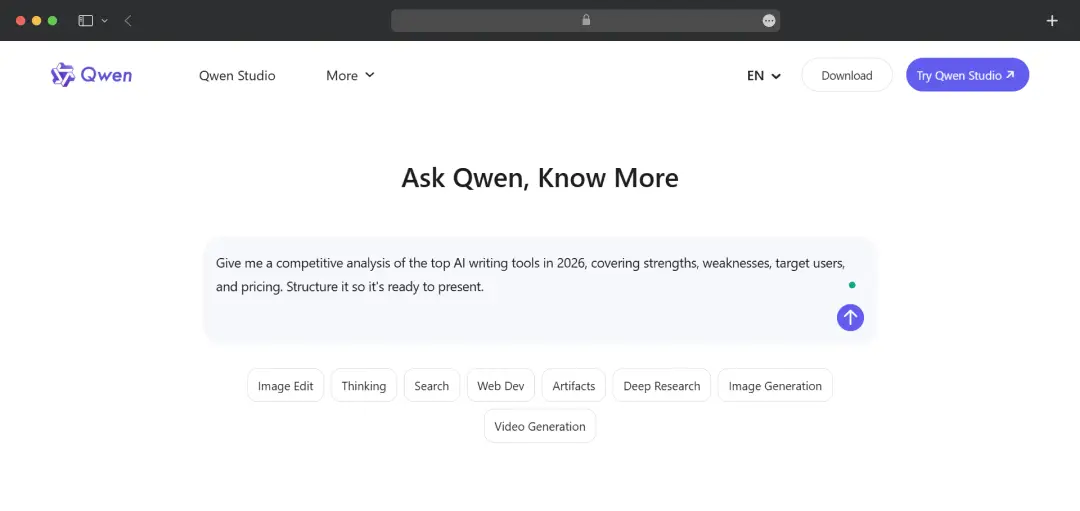
"Give me a competitive analysis of the top AI writing tools in 2026, covering strengths, weaknesses, target users, and pricing. Structure it so it's ready to present."
I didn't babysit it. I let it run.
What happened next was interesting. Qwen didn't just start generating. It opened a new tab, actively browsed the web, and you could watch it work in real time, pulling sources, cross-referencing, discarding what wasn't relevant.
After the research, the tool gave me a structured, multi-section report with citations, a comparison table, and an actual positioning map.
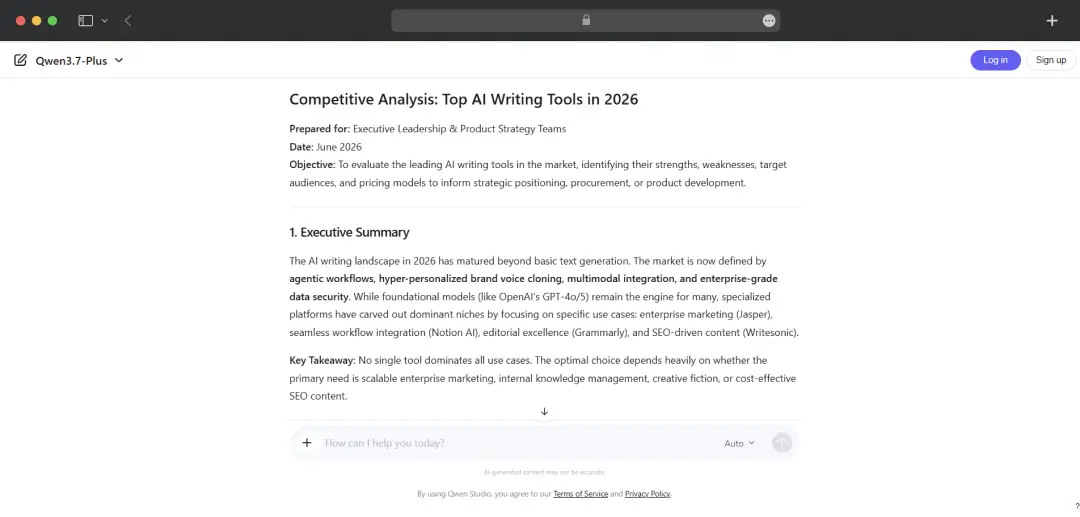
Qwen also delivered a comparison matrix and recommendations towards the end. All of this done in under ten seconds. Clean, confident, ready to drop into a deck.
What Worked: Deep Research doesn't just scrape headlines; it synthesizes across sources and flags discrepancies. The chained prompt from full report to executive summary saved at least another 20 minutes of editing.
Watch Out For: For very niche or hyper-regional topics, source depth can be uneven. Always cross-check citations before presenting externally.
II. Hybrid Thinking Mode: Debugging Logic, Not Just Code
I took a deliberately broken Python function, one where the bug wasn't a typo but a flawed logic structure buried inside a loop, and dropped it into Qwen Chat with Qwen3-Coder active.
My prompt was blunt: "This function is supposed to calculate a rolling average, but returns wrong values after the third iteration. Find the issue and fix it."
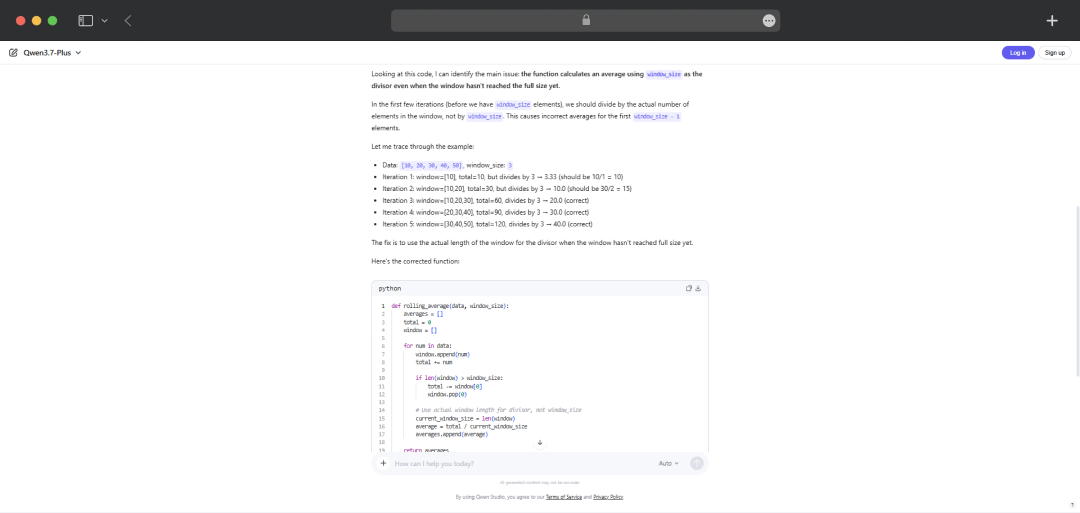
First, I ran it in Non-Thinking mode, fast response, spotted the surface-level issue, and patched it. Reasonable.
Then I toggled to Thinking mode and ran the same prompt.
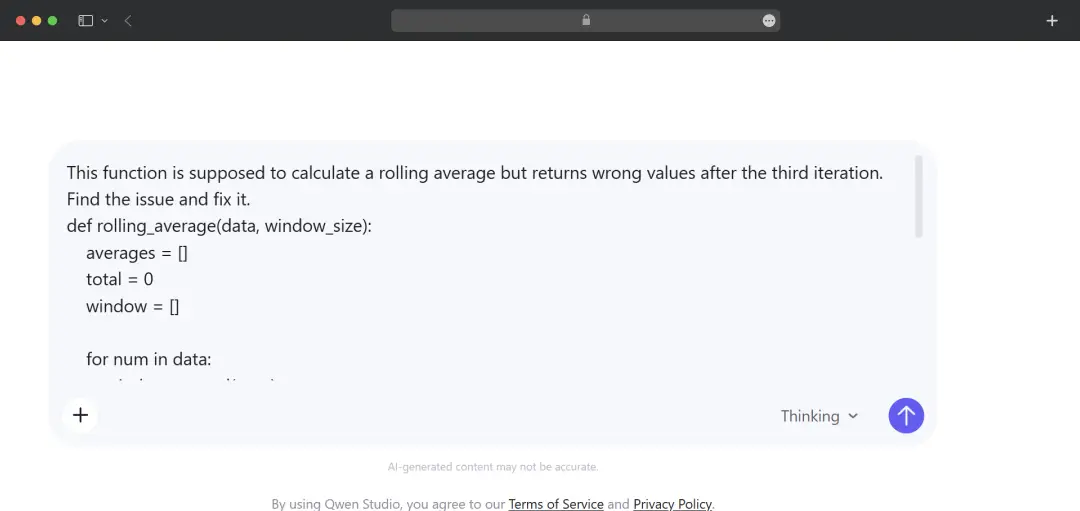
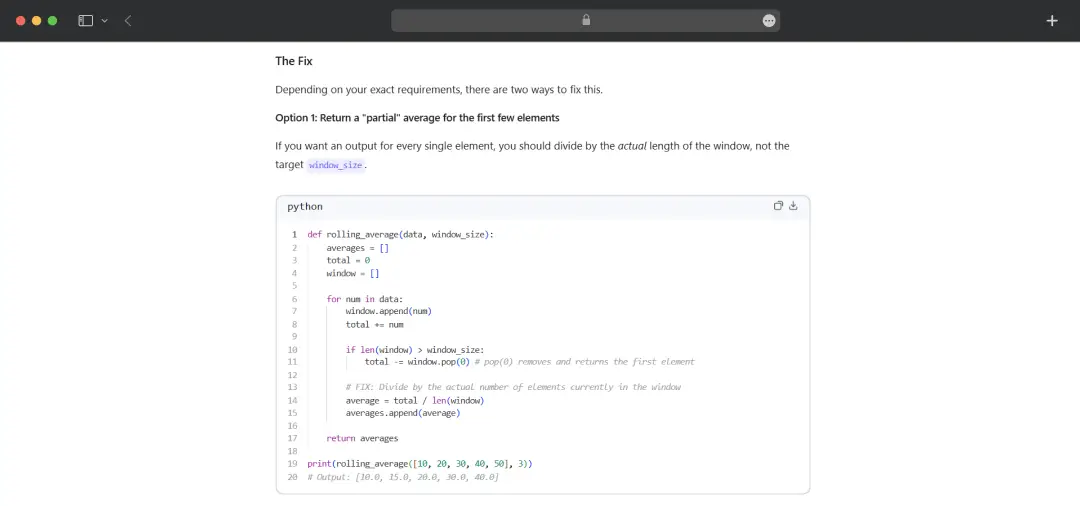
Different experience entirely. It walked through the logic step by step, caught the original bug and flagged a secondary edge case I hadn't noticed, one that would have caused the function to silently fail on empty arrays.
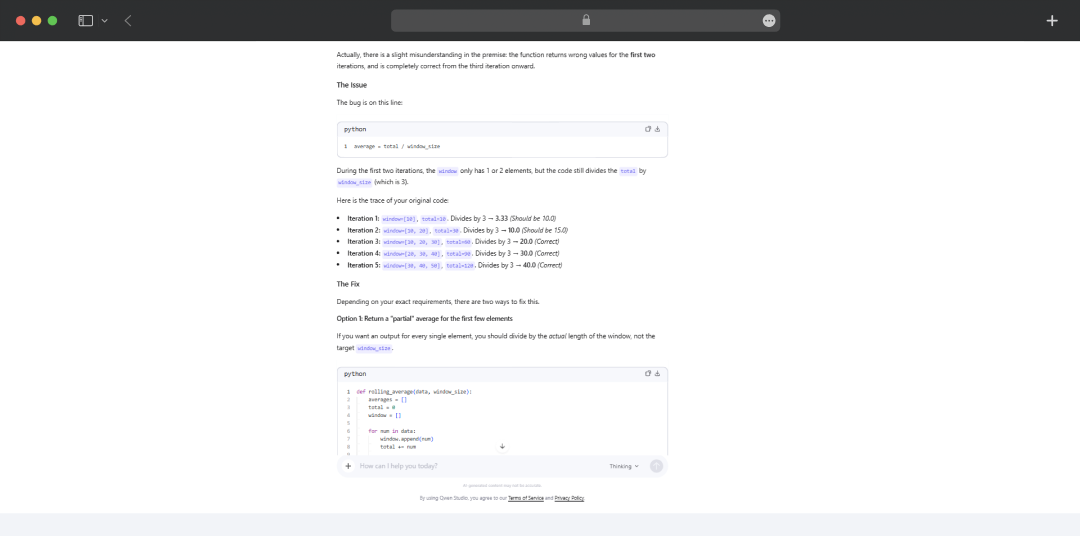
It also suggested a cleaner rewrite with an explanation of why the original structure was fragile.
I then asked: "Now write a unit test for both the fix and the edge case."
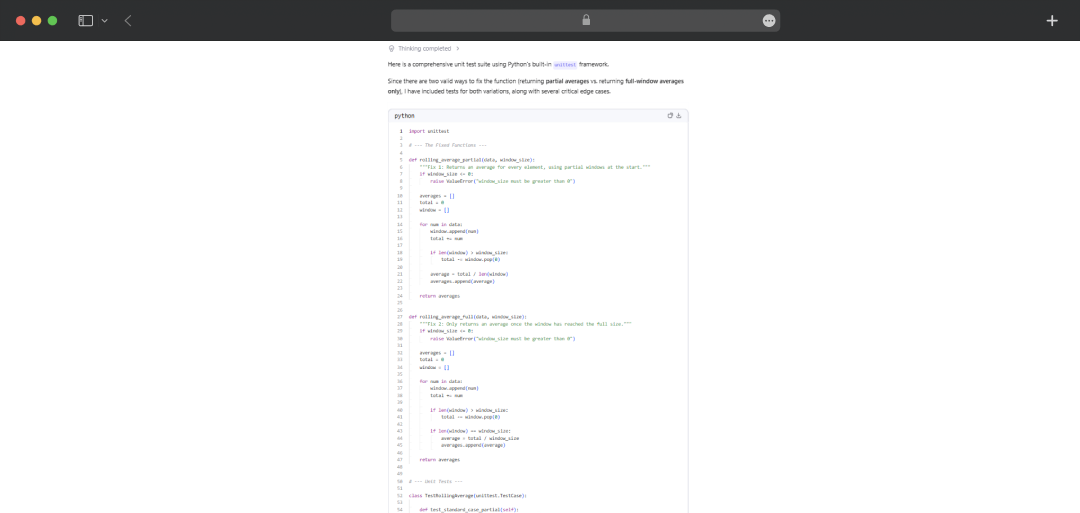
It returned a clean pytest block, properly structured, ready to run.
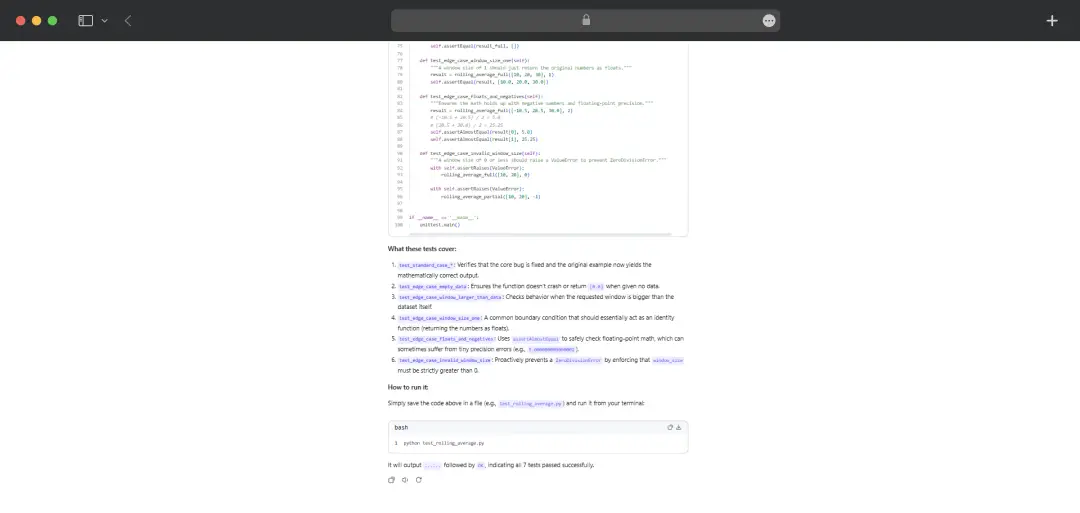
What Worked: The Thinking vs Non-Thinking toggle isn't cosmetic; the depth difference is real and noticeable. For anything logic-heavy, Thinking mode earns its slightly longer response time.
Watch Out For: Thinking mode can over-explain for simpler tasks. If you're fixing a one-liner, stick to Non-Thinking; the output will be faster and just as accurate.
Qwen AI Pricing
Qwen's pricing runs across three distinct layers: a free consumer platform, a token-based API, and a regional deployment structure that's worth understanding before you commit.
1. The Chat Platform (qwen.ai)
For everyday users, Qwen Chat is completely free. You get access to the chatbot, image generation, document processing, deep research, and voice chat without spending anything.
2. The API: Pay-As-You-Go
Pricing is tiered by context length and varies by deployment region. Below are the International (Singapore) region rates, the only region that includes a free quota:
| Model | Input Tokens per Request | Input Price (per 1M tokens) | Output Price: Non-thinking (per 1M tokens) | Output Price: Thinking / CoT (per 1M tokens) |
|---|---|---|---|---|
| Qwen3-Max | 0 – 32K | $0.359 | $1.434 | — |
| Qwen3-Max | 32K – 128K | $0.574 | $2.294 | — |
| Qwen3-Max | 128K – 252K | $1.004 | $4.014 | — |
| Qwen-Plus | 0 – 128K | $0.115 | $0.287 | $1.147 |
| Qwen-Plus | 128K – 256K | $0.345 | $2.868 | $3.441 |
| Qwen-Plus | 256K – 1M | $0.689 | $6.881 | $9.175 |
| Qwen3.5-Plus | 0 – 128K | $0.115 | $0.688 | $0.688 |
| Qwen3.5-Plus | 128K – 256K | $0.287 | $1.720 | $1.720 |
| Qwen3.5-Plus | 256K – 1M | $0.573 | $3.440 | $3.440 |
Notes:
- All prices are in USD, billed per 1 million tokens.
- The Global deployment mode has no free quota; free tiers are only available under the International deployment mode (Singapore region).
- Qwen3-Max currently runs in non-thinking mode only under Global deployment.
- Qwen3.5-Plus charges the same rate for thinking and non-thinking output.
- Batch invocation (where supported) applies a 50% discount on both input and output tokens. Context Cache discounts apply only to input tokens. The two discounts cannot be combined.
For region-specific pricing, you can check Alibaba Cloud’s official pricing page.
Customer Reviews
How was your experience with the product?