We are not biased. We test and review every product. Here's our Methodology.

Smart Calendars AI

A smarter way to manage your schedule — Smart Calendars AI blends automation, voice commands, and cross-platform sync to simplify your daily planning.

MobileAppDailyCertified Rating
4.3 out of 5
Available on:
Let Your Product Take the Center Stage with Our Review
Riya

Written By Riya

Riya turns everyday tech into effortless choices! With a knack for breaking down the latest gadgets, trends, and tips, she brings clarity and confidence to your downloading decisions. Her experience with ShopClues, Great Learning, and IndustryBuying adds depth to her reviews, making them both trustworthy and refreshingly practical.

From social media hacks and lifestyle upgrades to productivity boosts, digital marketing insights, AI trends, and more—Riya’s here to help you stay a step ahead. Always real, always relatable!

Explore More By Author

Smart Calendars AI Review: Is It Better Than A Regular Calendar App?

Smart Calendars AI Banner

I wasn’t looking for a new AI powered calendar & planner app. Honestly, I thought I had it figured out — juggling between Apple Calendar, a bunch of sticky notes, and reminders I never check. But then came Smart Calendars AI, and what started as a “let’s just try this for a day” turned into me literally building my life around it.

No exaggeration — the first time it turned a random work email into a fully planned calendar event (location, time, context, everything), I just stared at my screen like... wait, how did it do that? It even pulled out details from a photo of a coffee shop flyer I snapped and turned it into a reminder. I didn’t even know I needed that kind of magic until it happened.

This isn’t your typical calendar app with fancy colors and drag-and-drop (though yes, it has that too). This one thinks for you. It grabs info from everywhere — voice, text, images, emails, websites — and makes sense of it, neatly placing it on your schedule like it’s no big deal.

So if you’re like me — a little scattered but trying your best to keep it together — this might just be the calendar that finally gets you. Let’s dive into what makes Smart Calendars AI not just smart, but kinda genius.

Pros and Cons of Smart Calendars AI

Pros

  • Converts voice, text, photos, and links into calendar events instantly.
  • Snap a flyer or poster, and the AI-powered calendar app auto-creates a clean event with details.
  • Talk to your calendar like a human, no need to follow specific formats. (goes beyond conventional natural language processing).
  • Clean interface with widgets, drag-and-drop, and weather integration.
  • .ics files and shareable links make group planning seamless.

Cons

  • Full AI features require a subscription, which may not suit casual users.
  • Currently only available on iOS, iPadOS, and macOS (no Android yet).

Smart Calendars AI Features

Before we dive into what makes this app stand out, it’s worth noting what most smart calendars AI reviews agree on — it's not just about managing time, it's about making your day flow smarter. From automating event creation to syncing seamlessly across devices, Smart Calendars AI brings features that go beyond the basics. Let’s explore what’s under the hood.

1. Snap It, Plan It: Photo Recognition
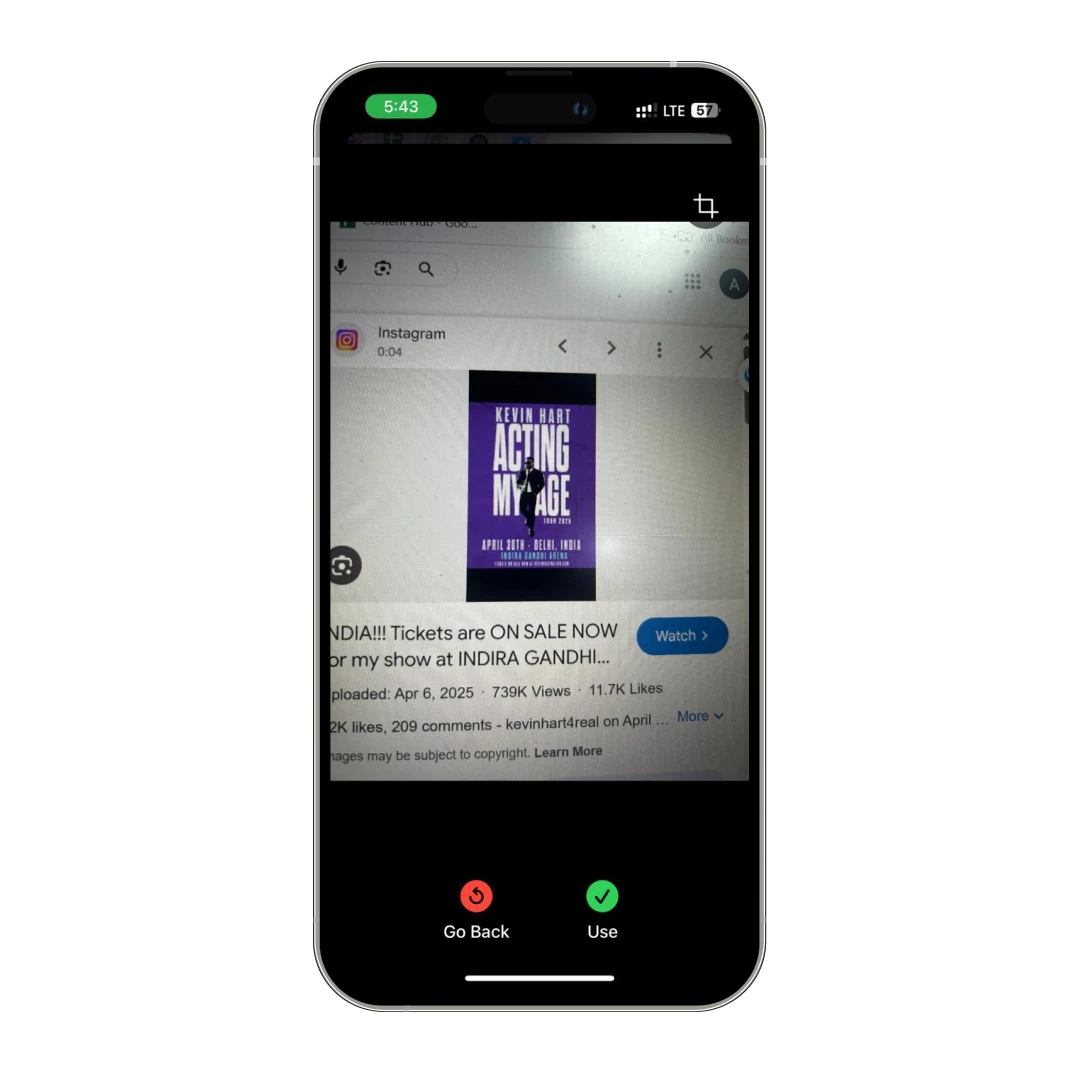
Ever spotted a flyer or poster about something cool — a concert, a yoga class, a garage sale — but forgot about it two seconds later? Been there. With Smart Calendars AI, you just snap a picture, and boom — it’s transformed into an event right in your calendar. No typing, no fuss. It's ridiculously satisfying to watch it pick up the details for you. I used it at a local food festival. Snapped the event poster and forgot about it. Next thing I know, my phone's reminding me to grab tickets before they sell out. 

2. Talk to Your Calendar: Voice Commands
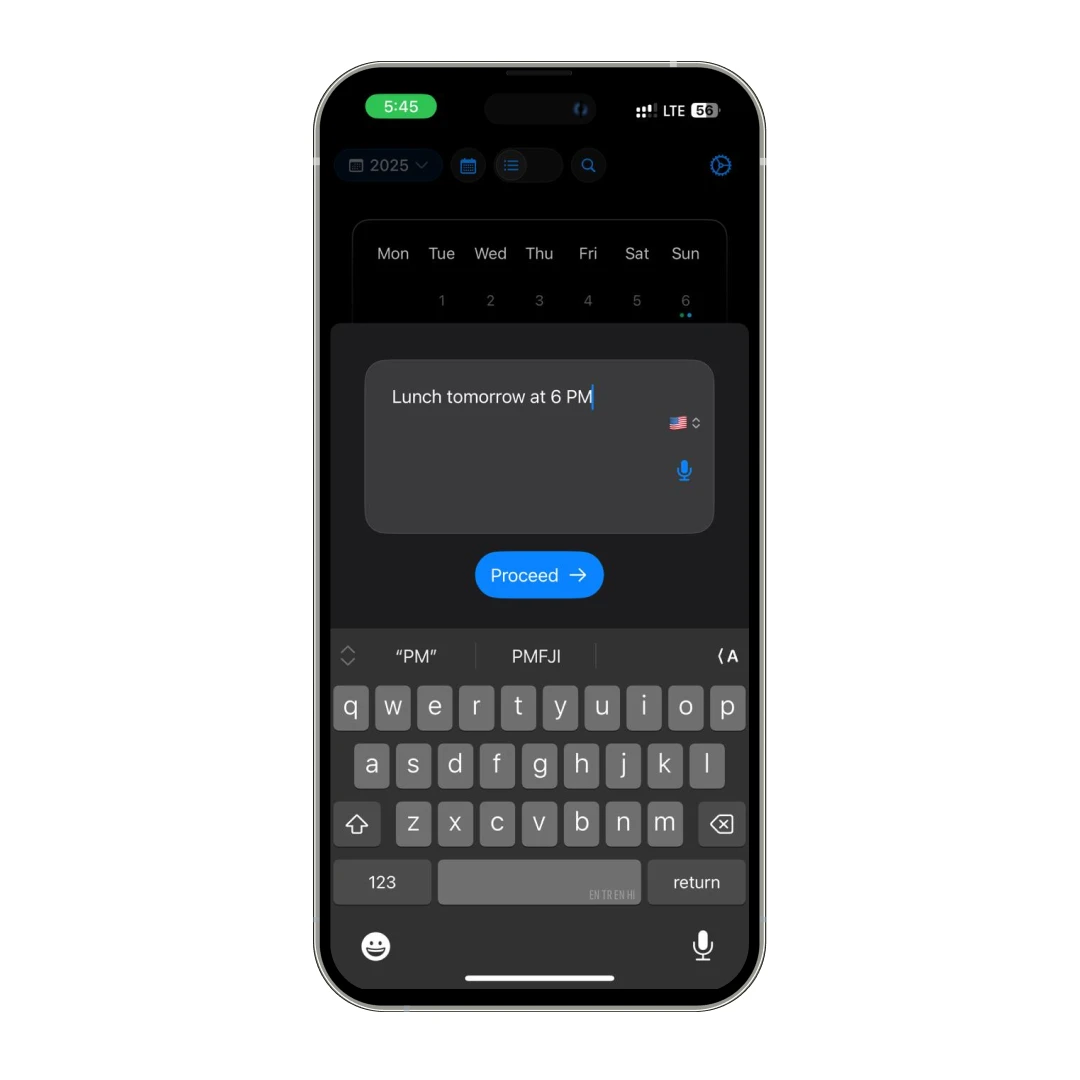
Typing is overrated when you're on the go (or just feeling lazy, no shame!). With voice commands, I was able to speak naturally, and Smart Calendars AI set it all up. Whether it's "Dinner with Sam Friday at 7" or "Meeting with design team tomorrow at 10 AM," the calendar productivity app gets it right without needing you to spell everything out. It even works across multiple languages, which is great if you juggle different clients or travel a lot.

3. Turn Anything into an Event: Text and Web Extraction

Got an email about a meeting? Or a random note scribbled on your phone? Maybe a website announcement for a webinar? Paste it into the app and (like magic) it converts into a full-fledged event. I once dropped an entire email invite from a client into Smart Calendars AI, and it parsed the date, time, location, and even the agenda points into my planner automatically.

4. Share Like a Pro: Easy Event Sharing
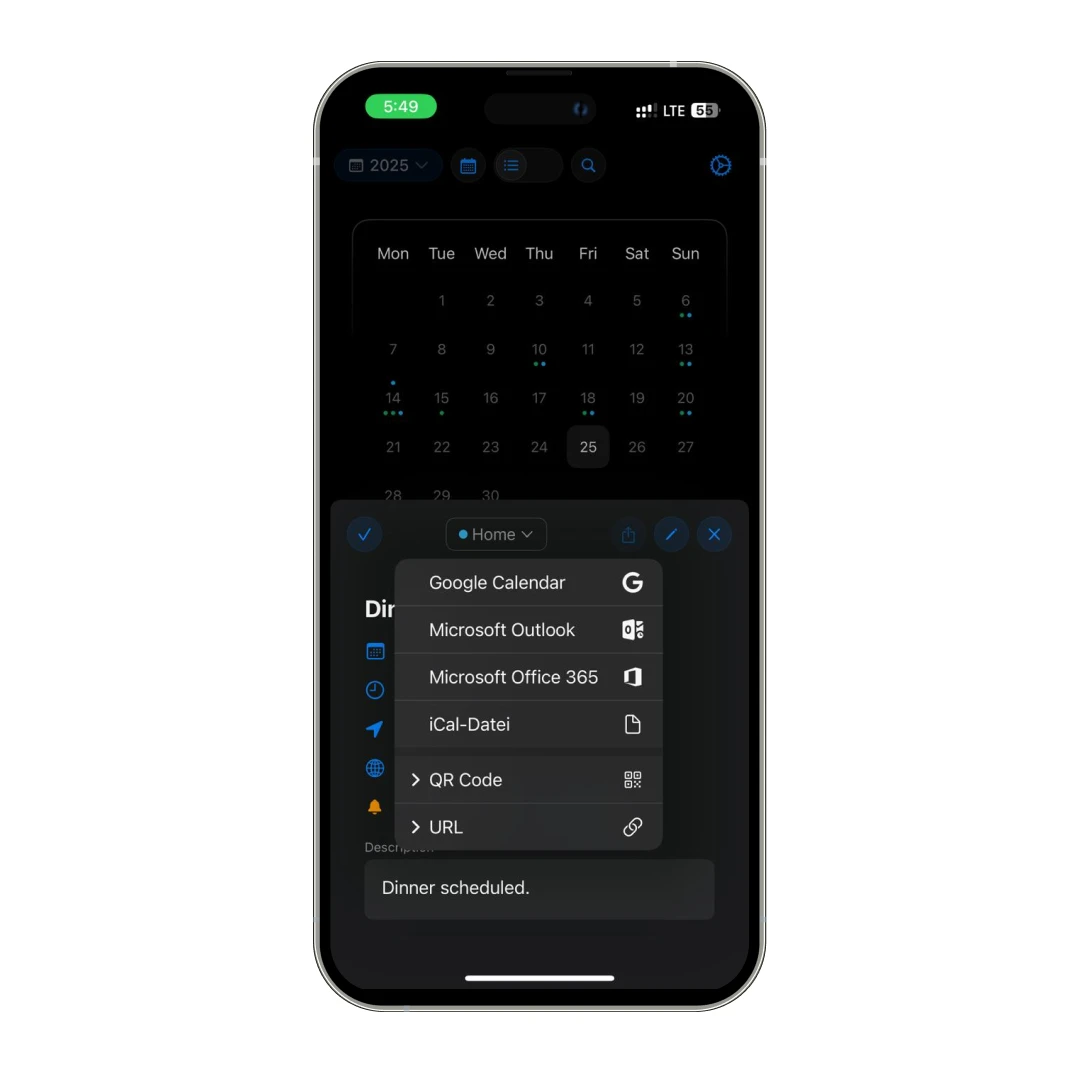
Trying to get a bunch of people on the same page is usually a nightmare. But Smart Calendars AI lets you share events either via a simple link, QR code, or .ics files. This means zero drama, fewer “what time again?” texts, and more time actually doing things.

5. Smart Extraction: AI That Just Gets You

You don't have to carefully phrase everything. Just write how you normally would even mix languages if you want. The app's smart extraction feature is built to understand messy human inputs and turn them into clean, well-organized events. It's kind of scary how well it handles casual info — like, you could say "Find a free lunch slot for a team meal next week" and it'll still set a tentative reminder for you to finalize it later. Wild.

Smart Calendars AI Review: Plans and Pricing

Plan Details Price
Free Basic access to app features (without AI features and weather data) $0.00
Full Access – 1 Month Premium features for 30 days $0.99
Full Access – 6 Months Premium features for 6 months $3.99
Full Access – 12 Months Premium features for 1 year $7.99

Why Trust MobileAppDaily?

For us, Product Reviews mean diving headfirst into the functionality of each digital product, whether it's an app, software, or website. Our process centers around hands-on testing of each tool we pick. From scrutinizing features to testing vulnerabilities of security standards, the goal remains to help you find products that don't just work but truly elevate your experience. In a nutshell, if we're recommending a product, it's because we believe it'll genuinely make your digital life easier.

  • Products Reviewed - 4,000+
  • No. Of Experts - 20+
  • Categories - 65+
Explore Our Methodology

Customer Reviews

Checking...

Rate the product based on your experience?

How was your experience with the product?

Also Reviewed By Us

MobileAppDaily’s Review of Smart Calendars AI

Expert Opinion

As a team, MobileAppDaily has reviewed more productivity apps than we can count — but Smart Calendars AI stood out for one big reason: it doesn’t just organize your schedule, it actively builds it for you. From snapping a photo of a flyer to pasting in a chunk of messy text, the AI works quietly in the background to convert chaos into clean, usable events.

We especially loved how seamless the multi-input event creation was — whether it was a voice note while driving or copying a Zoom invite from Slack, the app picked up all the important details and slotted them into the calendar without missing a beat. The photo recognition feature felt straight-up futuristic, and it genuinely cut down the time we usually spend manually scheduling things.

The UI is minimal and snappy, which we appreciate — no clutter, just your schedule front and center. Widgets, drag-and-drop, color coding, weather integrations — all the little touches that make a big difference are here.

Feature

FEATURE

4.5

Packed with powerful AI tools that genuinely save time and streamline event creation.

Pricing

PRICING

4.0

Reasonable for what it offers, but might feel premium for casual users.

Performance

PERFORMANCE

4.5

Fast, responsive, and handles inputs like a pro — just a few minor AI quirks here and there.

UI/UX

UI/UX

4.0

The app comes with a neat and sleek interface that makes navigation really easy.

Final Thoughts: Is Smart Calendars AI Worth It?

Honestly? Yeah. If you're tired of manually typing every little thing into your calendar or constantly flipping between apps to stay on top of your day, Smart Calendars AI is the upgrade your schedule's been waiting for.

It’s not just the flashy AI features — it's how effortlessly it all fits into your daily flow. Snap a pic, speak your mind, paste a messy email — and just like that, your planner’s sorted. No fluff, no overthinking. It’s like your brain but organized... and way more efficient.

Plus, with its minimal design and that oh-so-satisfying automation, planning your week starts to feel less like a chore and more like a flex. You even get a 30-day free trial to test the waters, so honestly, there’s no reason not to give it a spin.

If your calendar has ever stressed you out (and whose hasn’t?), this might be your new favorite app.

Smart Calendars AI
Frequently Asked Questions

FAQ
  • What is Smart Calendars AI, and how does it work?

    Smart Calendars AI is an intelligent AI-powered planner that uses artificial intelligence to automate event creation. It supports smart calendar scheduling by converting voice, text, images, and emails into organized calendar entries. Whether you're snapping a flyer or copying a meeting invite, the app detects relevant details like time, date, and location, and then schedules it instantly. It’s like having a smart assistant who understands your daily chaos and helps keep your calendar stress-free and efficient.

  • How does the photo-to-calendar event feature work?

    The photo-to-calendar event feature uses built-in photo recognition to scan posters, flyers, or documents and extract event information. You just take a picture, and Smart Calendars AI identifies key details such as the event title, location, and timing. It then creates a calendar event for you instantly. This feature is especially useful when you're on the go — no need to type a thing. It’s smart, fast, and extremely handy for visual planners.

  • Can I use text to calendar event creation with random notes or messages?

    Yes! The app’s text-to-calendar event capability lets you paste any note, message, or even a web snippet, and it auto-generates an event. This feature supports text-based event creation by understanding natural language, so even if the input is informal, the AI still processes the important info. It's perfect for converting a quick reminder or a casual text into something actionable. No formatting needed — just drop it in, and let the calendar do the work.

  • Does Smart Calendars AI support voice command scheduling?

    Absolutely. Voice command scheduling is one of Smart Calendars AI’s most user-friendly features. Just speak your event aloud — for example, “Call with Alex next Friday at 3 PM” — and the app creates the entry for you. It supports natural language, so there’s no need to speak in robotic commands. Whether you're in the car or making coffee, this hands-free option keeps your schedule updated with minimal effort, making it ideal for multitaskers or busy professionals.

  • Can Smart Calendars AI turn an email into a calendar event?

    Yes, and it’s a game-changer! The email-to-calendar event feature lets you paste email content directly into the app, and it will extract event details like time, location, and meeting context. This works great for work invites, client updates, or even booking confirmations. The smart calendar scheduling engine parses the email intelligently, cutting down the manual work of transferring info from your inbox to your planner. It saves time and ensures nothing important slips through the cracks.

  • How accurate is the photo recognition calendar feature?

    The photo recognition calendar tool is surprisingly accurate. It uses OCR (optical character recognition) and AI to scan photos for event-related info, even if the layout is cluttered. We've tested it with posters, whiteboards, and even handwritten notes — and it picked up the date, location, and name of the event in most cases. While it may occasionally misinterpret messy handwriting or low-res images, the accuracy for printed or digital visuals is impressive and super practical.

  • Can I use Smart Calendars AI for work and personal scheduling?

    Yes, Smart Calendars AI is perfect for both personal and professional use. Its smart calendar scheduling features help you manage everything from client calls to family dinners. You can color-code events, organize tasks using drag-and-drop, and sync across Apple devices (or Google calendar). Whether it’s email-to-calendar event conversion for meetings or voice command scheduling for personal plans, the flexibility and automation make it a one-stop calendar solution for managing your entire week effortlessly.

  • Is Smart Calendars AI secure to use with private information?

    Yes, privacy is a key part of Smart Calendars AI’s design. Most of the text-based event creation, photo to calendar events, and other features are processed locally on your device, reducing reliance on cloud storage. This ensures sensitive data from your voice inputs, emails, or private notes isn’t stored or shared without your consent. So whether you're using it for work meetings or personal errands, you can rely on the app’s commitment to keeping your information safe.

Delve into our comprehensive yet easy-to-consume guides, which provide insights that help scale business faster and prevent unseen pitfalls.

Related Products

Cut through the clutter and explore related digital products that deliver on performance.